
Lincoln Aviator 2020-2026 Owners Manual / Appendices / Declaration of Conformity
Lincoln Aviator: Appendices / Declaration of Conformity
Your vehicle could have components that transmit and receive radio waves and are therefore subject to government regulation.
These components must accept any interference received, including interference that could cause undesired operation. For certification labels and declarations of conformity, visit
www.wirelessconformity.ford.com.
 End User License Agreement
VEHICLE SOFTWARE END USER
LICENSE AGREEMENT (EULA)
You (“You” or “Your” as applicable) have
acquired a vehicle having several
devices, including SYNC ® and various
control modules, ("DEVICES") that include
software licensed or owned by Ford
Motor Company and its affiliates ("FORD
MOTOR COMPANY")...
 Declaration of Conformity - Vehicles With: SYNC 3
Radio Frequency Statement
WARNING: Changes or modifications
not expressively approved by the party
responsible for compliance could void the
user's authority to operate the equipment...
Other information:
Lincoln Aviator 2020-2026 Service Manual: Diagnosis and Testing - Body System
Symptom Chart(s) Diagnostics in this manual assume a certain skill level and knowledge of Ford-specific diagnostic practices. REFER to: Diagnostic Methods (100-00 General Information, Description and Operation). Dust and Water Leaks Most dust and water leaks occur due to missing or incorrectly installed body sealer or components...
Lincoln Aviator 2020-2026 Service Manual: Removal and Installation - Passenger Side Footwell Air Discharge Temperature Sensor
Removal Fully lower the glove compartment. Disconnect the check strap. Push the stop tabs inward. Remove the passenger side register air discharge tempreature sensor. Disconnect the electrical connector...
Categories
- Manuals Home
- Lincoln Aviator Owners Manual
- Lincoln Aviator Service Manual
- Description and Operation - Body and Frame
- Changing the Front Wiper Blades - Vehicles With: Heated Wiper Blades
- USB Port and Power Point Locations
- New on site
- Most important about car
Locking and Unlocking the Doors from Inside
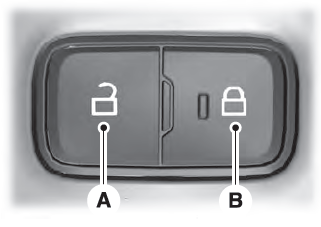
Locking the Doors
Press the lock switch on the door interior trim panel. The doors can no longer be released using the exterior door handle switches and the luggage compartment locks.

Copyright © 2026 www.liaviator2.com