
Lincoln Aviator: Parking Aid - Vehicles With: Parking Aid Camera / Description and Operation - Parking Aid - Overview
Overview
Rear Only Parking Aid Camera
The rear parking aid camera system visually aids the driver while reversing or reverse parking the vehicle. The camera system has features that provide fixed and active guideline overlays on the video image to assist the driver in aligning the vehicle and a visual alert function that provides a visual highlight in the zone where an object is detected by the audible parking aid system.
360 Degree View Camera
The 360 degree view camera system provides several different camera views to visually aid the driver while maneuvering the vehicle at low speed. The camera system is enabled by selecting reverse gear or pressing the camera selection switch when any gear except reverse is selected. The camera views are changed using the audio system display on-screen camera selection buttons. Available camera views depend on the transmission gear selection. The camera system provides fixed and active guideline overlays on the rear normal view video image to assist the driver in aligning the vehicle and a visual alert function that provides a visual highlight on the rear normal and 360 degree view images in the zone where an object is detected by the audible parking aid system.

 Description and Operation - Parking Aid - System Operation and Component Description
System Operation
Rear Only Parking Aid Camera
System Diagram
Item
Description
1
TRM
2
Rear camera on demand switch
3
Camera video signal (coaxial cable)
4
PCM
5
PAM
6
ABS module
7
PSCM
8
GWM
9
APIM
10
Rear parking aid camera
11
BCM
12
HVAC module
13
Audio system display
Network Message Chart
APIM Network Input Messages
Broadcast Message
Originating Module
Message Purpose
Gear lever position
PCM
Enables the video display when reverse is selected...
Other information:
Lincoln Aviator 2020-2026 Owners Manual: Vehicle Storage
If you plan on storing your vehicle for 30 days or more, read the following maintenance recommendations to make sure your vehicle stays in good operating condition. We engineer and test all motor vehicles and their components for reliable, regular driving...
Lincoln Aviator 2020-2026 Owners Manual: Adjusting the Headlamps
Vertical Aim Adjustment If your vehicle has been involved in a crash, have the aim of the headlamp beam checked by an authorized dealer. 8 ft (2.4 m). Ground to the center of the headlamp high beam bulb. 25 ft (7.6 m). Horizontal reference line...
Categories
- Manuals Home
- Lincoln Aviator Owners Manual
- Lincoln Aviator Service Manual
- Garage Door Opener
- Disabling Auto-Start-Stop
- Locking and Unlocking
- New on site
- Most important about car
Child Safety Locks
When the child safety locks are set, you cannot open the rear doors from the inside.
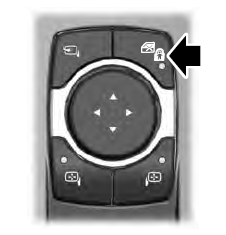
The child safety lock control is on the driver door.
Press the control to switch the child safety locks on. Press the control again to switch them off. A light on the child safety control illuminates when you switch them on.
