
Lincoln Aviator 2020-2026 Owners Manual / Lighting / Direction Indicators
Lincoln Aviator: Lighting / Direction Indicators
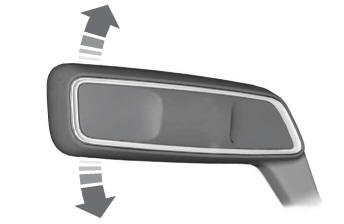
 Push the lever up or down to use
the direction indicators.
Push the lever up or down to use
the direction indicators.
Indicating a Lane Change
Tap the lever up or down to make the direction indicators flash three times to indicate a lane change.
 Adaptive Headlamps
About Adaptive Headlamps
The headlamps are designed to adapt when
you are steering around a curve, or if the
camera detects lane markings indicating a
curve or traffic signs indicating an
intersection...
 Welcome Lighting
The Lincoln welcome mat projection lights
are on the bottom of the exterior mirror
housings. They project an image onto the
ground a short distance from your vehicle
when welcome lighting or lighted entry turns
on...
Other information:
Lincoln Aviator 2020-2026 Owners Manual: Tire Rotation
WARNING: If the tire label shows different tire pressures for the front and rear tires and the vehicle has a tire pressure monitoring system, then you need to update the settings for the system sensors. Always perform the system reset procedure after tire rotation...
Lincoln Aviator 2020-2026 Service Manual: Removal and Installation - Rear Quarter Panel Moulding
Removal NOTE: Removal steps in this procedure may contain installation details. NOTE: LH side shown, RH side similar. Remove the screws. Torque: 33 lb.in (3.7 Nm) Remove the bolt. Torque: 89 lb.in (10 Nm) Remove the pushpin retainer clip...
Categories
- Manuals Home
- Lincoln Aviator Owners Manual
- Lincoln Aviator Service Manual
- Keyless Entry
- Description and Operation - Jacking and Lifting
- Child Safety Locks
- New on site
- Most important about car
Fastening the Seatbelts
The front outboard and rear safety restraints in the vehicle are combination lap and shoulder belts.
Insert the belt tongue into the proper buckle (the buckle closest to the direction the tongue is coming from) until you hear a snap and feel it latch. Make sure that you securely fasten the tongue in the buckle.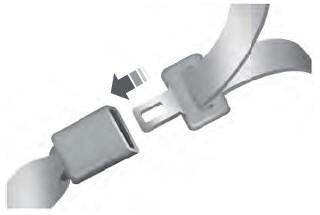

Copyright © 2026 www.liaviator2.com