
Lincoln Aviator 2020-2026 Owners Manual / Drive Mode Control
Lincoln Aviator: Drive Mode Control
 Blocked Sensors
Camera.
Radar sensor (if equipped).
If a message regarding a blocked sensor or
camera appears in the information display,
the radar signals or camera images are
obstructed...
 What Is Drive Mode Control
The system delivers a driving experience
through a suite of sophisticated electronic
vehicle systems. These systems optimize
steering, handling and powertrain response...
Other information:
Lincoln Aviator 2020-2026 Owners Manual: Pairing Your Cell Phone for the First Time
Go to the settings menu on your cell phone and switch Bluetooth on. Select the phone option on the feature bar. Select Add Phone.Note: A prompt alerts you to search for your vehicle on your cell phone. Select your vehicle on your cell phone.Note: A number appears on your cell phone and on the touchscreen...
Lincoln Aviator 2020-2026 Service Manual: General Procedures - Crankshaft Main Bearing Journal Clearance
Check NOTE: Refer to the appropriate Section 303-01 for the specification. NOTE: Crankshaft main bearing journals must be within specifications before checking journal clearance. Remove the crankshaft main bearing cap and crankshaft main bearing...
Categories
- Manuals Home
- Lincoln Aviator Owners Manual
- Lincoln Aviator Service Manual
- Opening and Closing the Hood
- Configuring The Head Up Display
- Changing the Front Wiper Blades - Vehicles With: Heated Wiper Blades
- New on site
- Most important about car
Fastening the Seatbelts
The front outboard and rear safety restraints in the vehicle are combination lap and shoulder belts.
Insert the belt tongue into the proper buckle (the buckle closest to the direction the tongue is coming from) until you hear a snap and feel it latch. Make sure that you securely fasten the tongue in the buckle.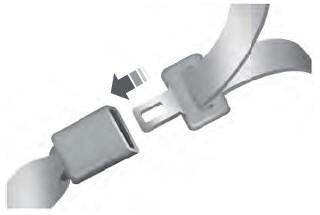

Copyright © 2026 www.liaviator2.com