
Lincoln Aviator: 360 Degree Camera (If Equipped) / Front Camera. Side Camera
Front Camera
WARNING: The front camera system still requires the driver to use it in conjunction with looking out of your vehicle.
Note: The system turns off the front video image when your vehicle is in motion at low speed, except when in reverse (R).
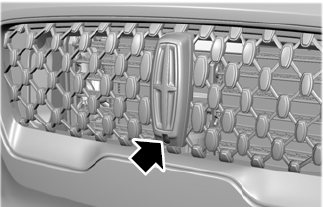
The front video camera is on the grille. It provides a video image of the area in front of your vehicle. It adds assistance to the driver while driving forward at low speeds. To use the front video camera system, place the transmission in any gear except reverse (R). An image displays once you press the front camera enable button. The image on the screen may vary according to your vehicle's orientation or road condition.
Side Camera
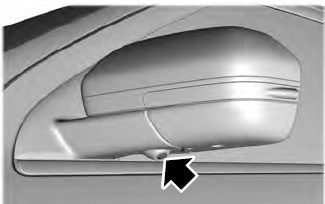
The side view camera, located in the outside mirror, provides a video image of the area on the sides of your vehicle as part of the front 360 + normal view and rear 360 + normal view. It aids you while parking your vehicle either forward or backwards.
 Using the System
Note: The 360 degree camera system turns
off when your vehicle is in motion at low
speed, except when in reverse (R).
The front and rear cameras have multiple
screens which consist of: normal view with
360, normal view, and split view...
 Cruise Control
What Is Cruise Control
Cruise control lets you maintain a set speed
without keeping your foot on the accelerator
pedal.
Requirements
Use cruise control when the vehicle speed
is greater than 20 mph (30 km/h)...
Other information:
Lincoln Aviator 2020-2026 Service Manual: Removal and Installation - Steering Column Upper Shaft
Removal NOTE: Removal steps in this procedure may contain installation details. Remove the steering column. Refer to: Steering Column (211-04 Steering Column, Removal and Installation). WARNING: Do not reuse steering column shaft bolts...
Lincoln Aviator 2020-2026 Owners Manual: Post-Crash Alert System
The system flashes the direction indicators and sounds the horn (intermittently) in the event of a serious impact that deploys an airbag (front, side, side curtain or Safety Canopy) or the seatbelt pretensioners. The horn and indicators turn off when: You press the hazard control button...
Categories
- Manuals Home
- Lincoln Aviator Owners Manual
- Lincoln Aviator Service Manual
- Remove and Reinstall the Battery
- Wireless Accessory Charger (If Equipped)
- Description and Operation - Jacking and Lifting
- New on site
- Most important about car
Child Seats
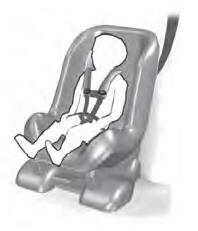
Use a child restraint (sometimes called an infant carrier, convertible seat, or toddler seat) for infants, toddlers and children weighing 40 lb (18 kg) or less (generally four-years-old or younger).
Using Lap and Shoulder Belts
WARNING: Do not place a rearward facing child restraint in front of an active airbag. Failure to follow this instruction could result in personal injury or death.
