Lincoln Aviator: Battery, Mounting and Cables / General Procedures - Battery Charging
Charging
.jpg) WARNING:
Before beginning any service procedure in this section,
refer to Safety Warnings in section 100-00 General Information. Failure
to follow this instruction may result in serious personal injury.
WARNING:
Before beginning any service procedure in this section,
refer to Safety Warnings in section 100-00 General Information. Failure
to follow this instruction may result in serious personal injury.
NOTE: Batteries will discharge due to normal parasitic key off-loads when the vehicle is on a dealer lot or parked by the customer for an extended period of time. Vehicles still in dealer inventory or in long-term storage may be driven short distances with heavy electrical loads. Over a period of time (30 days or more), this could result in vehicles having shallow or deeply discharged batteries.
NOTE: The vehicle charging system is designed to supply the electrical power needed to maintain the battery near full charge during normal vehicle use. The charging system is not capable of bringing a deeply discharged battery back to near full charge in a short amount of time such as allowing the vehicle to idle for 15 minutes to recharge the battery. Use an external charger to charge discharged batteries.
NOTE: Cold batteries will not readily accept a charge. Allow batteries to warm to approximately 5°C (41°F) before charging. This may require 4 to 8 hours at room temperature.
Charger Connected to a Chassis Ground - Preferred Method Primary Battery
-
For hybrid vehicles, disconnect the auxiliary negative ground cable.
Refer to: Battery Disconnect and Connect (414-01 Battery, Mounting and Cables, General Procedures).
-
Connect the positive (red) charger clamp to the positive battery post.
-
Connect the negative (black) charger clamp to a battery chassis ground.
-
Charge the battery following the battery charger manufacturer's instructions.
Charger Connected to Battery Posts
NOTE: The battery monitoring sensor must relearn the battery's state of charge after charging, refer to Battery State of Charge in section 414-00.
-
Disconnect the battery.
Refer to: Battery Disconnect and Connect (414-01 Battery, Mounting and Cables, General Procedures).
-
Connect the positive (red) charger clamp to the positive battery post.
-
Connect the negative (black) charger clamp to the negative battery post.
-
Charge the battery following the battery charger manufacturer's instructions.
Auxiliary Battery (Hybrid Vehicles)
-
Disconnect the auxiliary battery.
Refer to: Battery Disconnect and Connect (414-01 Battery, Mounting and Cables, General Procedures).
-
Connect the positive (red) charger clamp to the positive battery post.
-
Connect the negative (black) charger clamp to the negative battery post.
-
Using an Absorbed Glass Mat (AGM) battery charger, charge the battery for one hour at 2 amps.
 Diagnosis and Testing - Battery
General Equipment
Diagnostic Battery Charger
Use Ford approved battery test equipment.
Midtronics MDX-650 or P-300/P-600/490/1050
Midtronics GRX-3590 or 3000
Diagnostics in this manual assume a certain skill level and knowledge of Ford-specific diagnostic practices...
 General Procedures - Battery Disconnect and Connect
Disconnect
NOTE:
When the battery is disconnected and connected, some
abnormal drive symptoms may occur while the vehicle relearns its
adaptive strategy...
Other information:
Lincoln Aviator 2020-2026 Owners Manual: All-wheel drive system (if equipped)
WARNING: Do not become overconfident in the ability of four-wheel drive vehicles. Although a four-wheel drive vehicle may accelerate better than a two-wheel drive vehicle in low traction situations, it won't stop any faster than two-wheel drive vehicles...
Lincoln Aviator 2020-2026 Owners Manual: Entertainment
Audio Source Radio 1 Add the radio frequency to two decimal places to the command. 2 You can say the Sirius channel name or number such as "Sirius Channel 16" or "Sirius The Pulse". USB and Media Player 1 Add an album name, artist name, audiobook name, genre name, playlist name, podcast name or track name to the command...
Categories
- Manuals Home
- Lincoln Aviator Owners Manual
- Lincoln Aviator Service Manual
- Wireless Accessory Charger (If Equipped)
- Keyless Entry
- General Procedures - Transmission Fluid Drain and Refill
- New on site
- Most important about car
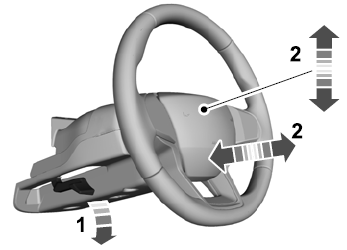
Adjusting the Steering Wheel - Vehicles With: Manual Adjustable Steering Column
WARNING: Do not adjust the steering wheel when your vehicle is moving.
Note: Make sure that you are sitting in the correct position.
Unlock the steering column. Adjust the steering wheel to the desired position.