
Lincoln Aviator: Paint - General Information / General Procedures - Paintwork Defects and Damage
Materials
| Name | Specification |
|---|---|
| Motorcraft® Acid Neutralizer ZC-1-A |
- |
| Motorcraft® Alkaline Neutralizer ZC-2-A |
- |
Repair
NOTE: Refinishing - Environmental Damage
-
Refer to: Body Repair Health and Safety and General Precautions (100-00 General Information, Description and Operation)..jpg) WARNING:
Before beginning any service procedure in this
manual, refer to health and safety warnings in section 100-00 General
Information. Failure to follow this instruction may result in serious
personal injury.
WARNING:
Before beginning any service procedure in this
manual, refer to health and safety warnings in section 100-00 General
Information. Failure to follow this instruction may result in serious
personal injury.
-
NOTICE: Never paint over iron particles as rust spots will reoccur. Use only the recommended decontamination procedure detailed below.
Rinse any dust, dirt and foreign material from the vehicle body with cold water. Flush liberally.
-
Prepare the acid neutralizer by mixing 8 parts of water to 1 part neutralizer in a bucket.
Material: Motorcraft® Acid Neutralizer / ZC-1-A
-
NOTICE: To avoid paint failure, do not allow the product to dry on the vehicle.
NOTE: Use a separate clean twisted lambs wool wash mitt for each product applied to the vehicle. Rinse frequently to remove any particles trapped in the fibers.
Working quickly and beginning at the top of the vehicle and working to the sides, apply the neutralizer mix to the entire vehicle. Keep the vehicle wet with the solution and lightly agitate for 5 to 7 minutes. Continue around the vehicle 4 to 5 times. For severe conditions, work the product for up to 8 minutes.
-
Rinse the vehicle completely with cold water to remove the product.
-
Dry only the horizontal surfaces of the vehicle, do not dry the glass at this time.
-
NOTICE: To avoid damage to the paint surface, do not apply the alkaline neutralizer directly to the vehicle plastic trim.
NOTE: Use a separate clean twisted lambs wool wash mitt for each product applied to the vehicle. Rinse frequently to remove any particles trapped in the fibers.
NOTE: Alkaline neutralizer is a ready-to-use product. Do not mix with water.
Pour the alkaline neutralizer into a squirt bottle and apply the solution to a clean closed-loop wash mitt.
Material: Motorcraft® Alkaline Neutralizer / ZC-2-A
-
NOTICE: To avoid paint failure, do not allow the alkaline neutralizer to dry on the vehicle.
Apply the product to the vehicle keeping the solution wet and lightly agitate for 5 to 7 minutes. For severe conditions, work the product for up to 8 minutes.
-
Rinse the vehicle completely with cold water to remove the product.
-
Using a clean closed-loop wash mitt and locally
available car wash soap, shampoo the entire vehicle exterior and rinse
with cold water. Dry the vehicle completely.
-
Visually inspect the paint surface for any remaining
evidence of ferrous metal particles. Repeat procedure as necessary.
-
NOTICE: When attempting to affect a repair by buffing, polishing or color sanding, do not remove an excess of 0.3 mil of paint film or refinishing will be required.
NOTE: Acid rain discoloring or etching may require color sanding in addition to buffing and polishing. In extreme cases, refinishing may be required if the following procedure does not restore the vehicle finish.
NOTE: Do not intermix buffing products. Use only one manufacturer’s product.
NOTE: Always follow the manufacturer’s product usage sequence. Use the appropriate buffing or polishing pad at the recommended buffing speed as specified by the product manufacturer.
Apply rubbing compound to the vehicle surface as recommended by the product manufacturer.
-
Apply machine glaze to the vehicle surface as recommended by the product manufacturer.
-
Use an alcohol and water mixture (1 to 1) to clean the
buffed and polished areas. Verify removal of scratches and swirls before
the application of the final polish.
-
Apply a final polish material by hand, with a
dual-action sander and foam pad, or with an orbital polisher and
appropriate polishing bonnet.
-
Using a locally available car wash soap, wash and dry the vehicle.
Repair
NOTE: Refinishing - Manufacturing Damage
-
Refer to: Body Repair Health and Safety and General Precautions (100-00 General Information, Description and Operation).
WARNING:
Before beginning any service procedure in this
manual, refer to health and safety warnings in section 100-00 General
Information. Failure to follow this instruction may result in serious
personal injury.
-
Wash the repair area with pH-neutral soap and water.
-
Remove any trim, emblems and hardware from the area to be repaired.
-
NOTE: All delamination must be removed.
Sand or media blast the damaged surface, keeping the repair area as minimal as possible.
-
Treat any bare metal surface to prevent flash corrosion,
and prime and block sand as necessary prior to refinishing.
-
Mask the adjacent panels to protect from overspray.
-
Spot repair the base coat as necessary, following the paint manufacturer's prescribed procedures.
-
Following the paint manufacturer's prescribed procedure, apply clear coat to the entire panel.
-
Reapply any trim, emblems and hardware previously removed from the repair area.


Other information:
Lincoln Aviator 2020-2026 Owners Manual: Motorcraft Parts - Plug-In Hybrid Electric Vehicle (PHEV)
1 If a Motorcraft oil filter is not available, use an oil filter that meets industry performance specification SAE/USCAR-36. 2 See your authorized dealer for correct replacement. 3 For spark plug replacement, contact your authorized dealer. Replace the spark plugs at the appropriate intervals...
Lincoln Aviator 2020-2026 Service Manual: Removal and Installation - Passenger Side Register
Special Tool(s) / General Equipment Interior Trim Remover Removal NOTE: Removal steps in this procedure may contain installation details. Release the clips and remove the switch assembly. Disconnect the electrical connector...
Categories
- Manuals Home
- Lincoln Aviator Owners Manual
- Lincoln Aviator Service Manual
- Garage Door Opener
- Keyless Entry
- Drive Modes
- New on site
- Most important about car
Remote Control
Passive Key
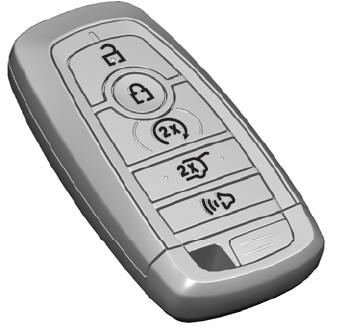
The passive key operates the power locks and the remote start system. The passive key must be in your vehicle to use the push button start.
Note: You may not be able to shift out of park (P) unless the passive key is inside your vehicle.
