Lincoln Aviator: Suspension System - General Information / General Procedures - Rear Toe Adjustment
Special Tool(s) / General Equipment
| Wheel Alignment System |
Adjustment
NOTICE: Do not use any tools or equipment to move the wheel and tire assembly or suspension components while checking for relative movement. Suspension damage may occur. The use of tools or equipment will also create relative movement that may not exist when using hand force. Relative movement must be measured using hand force only.
NOTE: Make sure that the vehicle is standing on a level surface.
NOTE: Before carrying out a toe adjustment, check the tires for the correct pressure. Inspect the tires for incorrect wear or damage. Inspect the suspension for wear or damage.
-
Steering wheel in straight ahead position.
.jpg) |
-
Using alignment equipment and the manufacturer's instructions, check the rear toe setting on both sides.
Use the General Equipment: Wheel Alignment System
-
NOTICE: The cam nut and cam bolt area must be free of foreign material to make sure of correct clamping.
NOTE: Clean the general area of the joint to prevent foreign material from entering the joint. Clean the area using only mild liquids.
On both sides.
-
NOTE: Make sure that the toe settings are not disturbed while tightening the nuts.
Loosen the toe link nut approximately one full turn.
Torque: 184 lb.ft (250 Nm)
-
Rotate the toe link bolt to achieve the specified toe setting.
-
.jpg) |
-
Recheck the rear toe settings and adjust as necessary.
-
NOTE: If equipped with Lane Departure Warning (LDW) System, camera alignment is required for the lane keeping alert and lane keeping aid to function correctly.
Connect the scan tool and perform the IPMA camera alignment procedure. Follow the scan tool directions.
 General Procedures - Rear Camber Adjustment
Special Tool(s) /
General Equipment
Wheel Alignment System
Adjustment
NOTICE:
Suspension fasteners are critical parts that affect the
performance of vital components and systems...
 General Procedures - Ride Height Measurement
Special Tool(s) /
General Equipment
Surface Gauge
Check
NOTE:
Make sure that the vehicle is positioned on a flat,
level surface and the tires are inflated to the correct pressure...
Other information:
Lincoln Aviator 2020-2026 Service Manual: General Procedures - Camshaft Surface Inspection
Inspect the camshaft lobes for pitting or damage in the active area. Minor pitting is acceptable outside the active area. The active area includes the opening ramp and closing ramp. The opening ramp is the point where the lifter just begins to lift until the point it reaches the nose of the lobe...
Lincoln Aviator 2020-2026 Service Manual: General Procedures - Engine Oil Draining and Filling
Special Tool(s) / General Equipment Oil Drain Equipment Draining With the vehicle in NEUTRAL, position it on a hoist. Refer to: Jacking and Lifting (100-02 Jacking and Lifting, Description and Operation). NOTE: Use a shop towel when removing the oil filter housing to prevent oil from spilling on the engine or accessory components...
Categories
- Manuals Home
- Lincoln Aviator Owners Manual
- Lincoln Aviator Service Manual
- Opening and Closing the Hood
- Keyless Entry
- Remove and Reinstall the Battery
- New on site
- Most important about car
Activating Intelligent Access
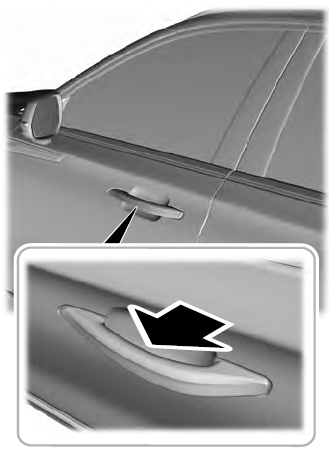
The intelligent access key must be within 3 ft (1 m) of the door or luggage compartment you intend to lock or unlock.
At a Door
Electronic door handles are on each door. Gently depress the switch inside the exterior door handle to unlock and open the door. An unlock symbol illuminates on the door window trim indicating your vehicle is unlocked.