
Lincoln Aviator 2020-2026 Service Manual / Electrical / Information and Entertainment Systems / Information and Entertainment System - General Information
Lincoln Aviator: Information and Entertainment Systems / Information and Entertainment System - General Information
- Removal and Installation - Telematics Control Unit (TCU) Module Antenna Coaxial Cable
- Removal and Installation - Voice Microphone
 Removal and Installation - Telematics Control Unit (TCU) Module Antenna
Removal
NOTE:
Removal steps in this procedure may contain installation details.
Remove the LH loadspace trim panel.
Refer to: Loadspace Trim Panel (501-05 Interior Trim and Ornamentation, Removal and Installation)...
 Removal and Installation - Telematics Control Unit (TCU) Module Antenna Coaxial Cable
Removal
NOTE:
Removal steps in this procedure may contain installation details.
Remove the subwoofer speaker.
Refer to: Subwoofer Speaker (415-00 Information and Entertainment System - General Information, Removal and Installation)...
Other information:
Lincoln Aviator 2020-2026 Service Manual: Diagnosis and Testing - Fog Lamps
Diagnostic Trouble Code (DTC) Chart Diagnostics in this manual assume a certain skill level and knowledge of Ford-specific diagnostic practices. REFER to: Diagnostic Methods (100-00 General Information, Description and Operation). Diagnostic Trouble Code Chart Module DTC Description Action BCM B1147:11 Left Front Fog Lamps:Circuit Short To Ground GO to Pinpoint Test B BCM B1147:15 Left Front Fog Lamps:Circuit Short To Battery or Open GO to Pinpoint Test B BCM B1148:11 Right Front Fog Lamps:Circuit Short To Ground GO to Pinpoint Test B BCM B1148:15 Right Front Fog Lamps:Circuit Short To Battery or Open GO to Pinpoint Test B BCM B1499:11 Exterior Lamps Power Supply "A":Circuit Short To Ground GO to Pinpoint Test B BCM B1499:15 Exterior Lamps Power Supply "A":Circuit Short To Battery or Open GO to Pinpoint Test B BCM B149D:11 Exterior Lamps Power Supply "B":Circuit Short To Ground GO to Pinpoint Test B BCM B149D:15 Exterior Lamps Power Supply "B":Circuit Short To Battery or Open GO to Pinpoint Test B BCM B1A79:11 Rear Fog Lamp:Circuit Short To Ground GO to Pinpoint Test C BCM B1A79:15 Rear Fog Lamp:Circuit Short To Battery or Open GO to Pinpoint Test C Symptom Chart Symptom Chart: Fog Lamps Diagnostics in this manual assume a certain skill level and knowledge of Ford-specific diagnostic practices...
Lincoln Aviator 2020-2026 Service Manual: Removal and Installation - Rear Spoiler
Special Tool(s) / General Equipment Interior Trim Remover Removal NOTE: Removal steps in this procedure may contain installation details. Open the rear tail gate. Release the clips and remove the upper liftgate trim panel...
Categories
- Manuals Home
- Lincoln Aviator Owners Manual
- Lincoln Aviator Service Manual
- General Procedures - Transmission Fluid Drain and Refill
- Wireless Accessory Charger (If Equipped)
- Remove and Reinstall the Battery
- New on site
- Most important about car
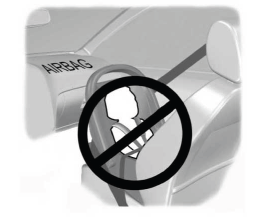
Children and Airbags
WARNING: Airbags can kill or injure a child in a child restraint. Never place a rear-facing child restraint in front of an active airbag. If you must use a forward-facing child restraint in the front seat, move the seat upon which the child restraint is installed all the way back.

Copyright © 2026 www.liaviator2.com