Lincoln Aviator: Data Privacy / Mobile Device Data
If you connect a mobile device to your vehicle, you can display data from your device on the touchscreen for example, music and album art. You can share your vehicle data with mobile apps on your device through the system.
The mobile apps function operates by your connected device sending data to us in the United States. The data is encrypted and includes, for example, the vehicle identification number of your vehicle, the SYNC module serial number, odometer, enabled apps, usage statistics and debugging information. We retain it only as long as necessary to provide the service, to troubleshoot, for continuous improvement and to offer you products and services that may be of interest to you according to your preferences and where allowed by law.
If you connect a cell phone to the system, the system creates a profile that links to that cell phone. The cell phone profile enables more mobile features and efficient operation. The profile contains, for example data from your phonebook, read and unread text messages and call history, including history of calls when your cell phone was not connected to the system.
If you connect a media device, the system creates and retains a media device index of supported media content. The system also records a short diagnostic log of approximately 10 minutes of all recent system activity.
The cell phone profile, media device index and diagnostic log remain in your vehicle unless you delete them and are generally accessible only in your vehicle when you connect your cell phone or media device. If you no longer plan to use the system or your vehicle, we recommend you use the master reset function to erase the stored information.
System data cannot be accessed without special equipment and access to your vehicle's module.
For additional information about our privacy policy, refer to the local Lincoln website.
Note: To find out if your vehicle has connectivity technology, visit www.ConnectedLincoln.com.
 Connected Vehicle Data
The modem has a SIM. The
modem was enabled when your
vehicle was built and periodically
sends messages to stay connected to the
cell phone network, receive automatic
software updates and send vehicle-related
information to us, for example diagnostic
information...
 Emergency Call System Data
When the emergency call system is active,
it may disclose to emergency services that
your vehicle has been in a crash involving
the deployment of an airbag or activation of
the fuel pump shut-off...
Other information:
Lincoln Aviator 2020-2026 Service Manual: Diagnosis and Testing - Turn Signal and Hazard Lamps
Diagnostic Trouble Code (DTC) Chart Diagnostics in this manual assume a certain skill level and knowledge of Ford-specific diagnostic practices. REFER to: Diagnostic Methods (100-00 General Information, Description and Operation). Diagnostic Trouble Code Chart Module DTC Description Action BCM B123A:11 Left Front Turn Indicator:Circuit Short To Ground GO to Pinpoint Test C BCM B123A:15 Left Front Turn Indicator:Circuit Short To Battery Or Open GO to Pinpoint Test C BCM B123B:11 Right Front Turn Indicator:Circuit Short To Ground GO to Pinpoint Test C BCM B123B:15 Right Front Turn Indicator:Circuit Short To Battery Or Open GO to Pinpoint Test C BCM B1247:11 Left Rear Turn Indicator:Circuit Short To Ground GO to Pinpoint Test D BCM B1247:15 Left Rear Turn Indicator:Circuit Short To Battery or Open GO to Pinpoint Test D BCM B1248:11 Right Rear Turn Indicator:Circuit Short To Ground GO to Pinpoint Test D BCM B1248:15 Right Rear Turn Indicator:Circuit Short To Battery or Open GO to Pinpoint Test D BCM B1265:01 Left Rear Turn Lamp Feedback:General Electrical Failure GO to Pinpoint Test G BCM B1266:01 Right Rear Turn Lamp Feedback:General Electrical Failure GO to Pinpoint Test G BCM B1497:01 Left Front Turn Lamp Feedback:General Electrical Failure GO to Pinpoint Test G BCM B1498:01 Right Front Turn Lamp Feedback:General Electrical Failure GO to Pinpoint Test G BCM B1D35:11 Hazard Switch:Circuit Short to Ground GO to Pinpoint Test F DDM B1D06:11 Left Turn Indicator:Circuit Short To Ground GO to Pinpoint Test E DDM B1D06:15 Left Turn Indicator:Circuit Short To Battery Or Open GO to Pinpoint Test E PDM B1D07:11 Right Turn Indicator:Circuit Short To Ground GO to Pinpoint Test E PDM B1D07:15 Right Turn Indicator:Circuit Short To Battery Or Open GO to Pinpoint Test E SCCM B124C:96 Turn Indicator Stalk Switch Pack:Component Internal Failure GO to Pinpoint Test H SCCM B124C:9E Turn Indicator Stalk Switch Pack:Stuck On GO to Pinpoint Test H Symptom Chart(s) Symptom Chart: Turn Signal and Hazard Lamps Diagnostics in this manual assume a certain skill level and knowledge of Ford-specific diagnostic practices...
Lincoln Aviator 2020-2026 Service Manual: General Procedures - Piston Diameter
Check Measure the piston diameter 90 degrees from the piston pin and piston diameter (DN) height down from the top of the piston at the point indicated. Refer to specifications for the piston diameter (DN) height. Refer to: Specifications (303-01A Engine - 3...
Categories
- Manuals Home
- Lincoln Aviator Owners Manual
- Lincoln Aviator Service Manual
- Disabling Auto-Start-Stop
- General Procedures - Transmission Fluid Drain and Refill
- Body and Paint
- New on site
- Most important about car
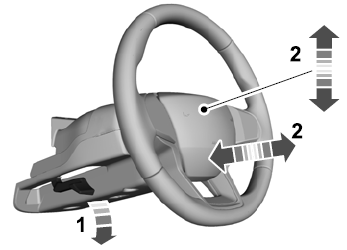
Adjusting the Steering Wheel - Vehicles With: Manual Adjustable Steering Column
WARNING: Do not adjust the steering wheel when your vehicle is moving.
Note: Make sure that you are sitting in the correct position.
Unlock the steering column. Adjust the steering wheel to the desired position.