
Lincoln Aviator: Doors and Locks / Opening the Doors

Front Doors

Lincoln Aviator. Opening the Doors Press the door release button on the armrest to release the door. Push the door out to open the door.

Rear Doors

Lincoln Aviator. Opening the Doors Press the unlock switch on the door and then press the door release button on the armrest to release the door. The first press unlocks the door and the second press unlatches the door. Push the door out to open the door.

Note: When your vehicle reaches a speed greater than 2 mph (3 km/h), you will only be able to release the door by pressing the unlock button and then door release button within two seconds.

Note: Do not use the door latch assembly to attach any accessory, such as handles or steps, as this can cause damage to your vehicle.

    Closing the Luggage Compartment

    From Inside Your Vehicle Press the button on the instrument panel to close the luggage compartment. With the Remote Control Press twice within three seconds to close the luggage compartment...

    Emergency Door Release. Soft Closing Door

    Emergency Door Release If you are inside your vehicle and unable to use the electronic door system, you can open the driver door using the emergency door release switch in the map pocket...

    Other information:

    Lincoln Aviator 2020-2026 Service Manual: Diagnosis and Testing - Steering Wheel and Column Electrical Components


    Diagnostic Trouble Code (DTC) Chart Diagnostics in this manual assume a certain skill level and knowledge of Ford-specific diagnostic practices. REFER to: Diagnostic Methods (100-00 General Information, Description and Operation).   Diagnostic Trouble Code Chart Module   DTC Description Action   BCM B108A:01 Start Button: General Electrical Failure   GO to Pinpoint Test A   BCM B108A:24 Start Button: Signal Stuck High   GO to Pinpoint Test A   BCM B1142:29 Ignition Status 1: Signal Invalid   GO to Pinpoint Test A   BCM B1240:11 Start Button Mode Indicator: Circuit Short to Ground   GO to Pinpoint Test B   BCM B1240:15 Start Button Mode Indicator: Circuit Short to Battery or Open   GO to Pinpoint Test C   BCM B1310:12 Run/Start Control: Circuit Short to Battery   GO to Pinpoint Test A   BCM B1310:14 Run/Start Control: Circuit Short to Ground or Open   GO to Pinpoint Test A   SCCM B112B:04 SCCM:Steering Wheel Module: System Internal Failure   GO to Pinpoint Test I   SCCM B112B:44 SCCM:Steering Wheel Module: Data Memory Failure   GO to Pinpoint Test I   SCCM B112B:45 SCCM:Steering Wheel Module: Program Memory Failure   GO to Pinpoint Test I   SCCM B112B:46 SCCM:Steering Wheel Module: Calibration / Parameter Memory Failure   GO to Pinpoint Test I   SCCM B112B:49 SCCM:Steering Wheel Module: Internal Electronic Failure   GO to Pinpoint Test I   SCCM B135C:11 Heater Element:Circuit Short To Ground   GO to Pinpoint Test G   SCCM B135C:13 Heater Element:Circuit Open   GO to Pinpoint Test G   SCCM U0140:00 Lost Communication With Body Control Module: No Sub Type Information   GO to Pinpoint Test H   SCCM U0140:00 SCCM:Lost Communication With Body Control Module: No Sub Type Information   GO to Pinpoint Test J   SCCM U0146:00 SCCM:Lost Communication With Gateway "A": No Sub Type Information   GO to Pinpoint Test J   SCCM U0146:87 SCCM:Lost Communication With Gateway "A": No Sub Type Information   GO to Pinpoint Test J   SCCM U0155:00 SCCM:Lost Communication With Instrument Panel Cluster Module: No Sub Type Information   GO to Pinpoint Test J   SCCM U023A:00 SCCM:Lost Communication With Image Processing Module "A": No Sub Type Information   GO to Pinpoint Test J   SCCM U0241:00 SCCM:Lost Communication With Headlamp Control Module: No Sub Type Information   GO to Pinpoint Test J   SCCM U210A:11 Temperature Sensor:Circuit Short To Ground   GO to Pinpoint Test G   SCCM U210A:13 Temperature Sensor:Circuit Open   GO to Pinpoint Test G   SCCM U3003:A2 Battery Voltage: System Voltage Low   GO to Pinpoint Test E   SCCM U3003:A3 Battery Voltage:System Voltage High   GO to Pinpoint Test F   SECM B135C:11 Heater Element:Circuit Short To Ground   GO to Pinpoint Test K   SECM B135C:15 Heater Element:Circuit Short to Battery or Open   GO to Pinpoint Test K   SECM B13BD:92 Steering Wheel Heater Module:Performance or Incorrect Operation   GO to Pinpoint Test K   SECM U1000:00 Solid State Driver Protection Active:No Sub Type Information   GO to Pinpoint Test K   SECM U210A:02 Temperature Sensor:General Signal Failure   GO to Pinpoint Test K   SECM U210A:11 Temperature Sensor:Circuit Short to Ground   GO to Pinpoint Test K   SECM U210A:15 Temperature Sensor:Circuit Short to Battery or Open   GO to Pinpoint Test K   SIMA U0100:00 Lost Communication With ECM/PCM "A": No Sub Type Information   GO to Pinpoint Test L   SIMA U0140:00 Lost Communication With Body Control Module: No Sub Type Information   GO to Pinpoint Test L   SIMA U3003:16 Battery Voltage:Battery Voltage Below Threshold   GO to Pinpoint Test M   SIMA U3003:17 Battery Voltage:Battery Voltage Above Threshold   GO to Pinpoint Test N Symptom Charts Symptom Chart: Ignition Switch - Push Button Diagnostics in this manual assume a certain skill level and knowledge of Ford-specific diagnostic practices...

    Lincoln Aviator 2020-2026 Service Manual: Removal and Installation - Remote Function Actuator (RFA) Module


    Removal NOTE: This step is only necessary when installing a new component. NOTE: If installing a new module, it is necessary to upload the module configuration information to the diagnostic scan tool prior to removing the module. This information must be downloaded into the new module after installation...

    Categories

    Children and Airbags

    WARNING: Airbags can kill or injure a child in a child restraint. Never place a rear-facing child restraint in front of an active airbag. If you must use a forward-facing child restraint in the front seat, move the seat upon which the child restraint is installed all the way back.
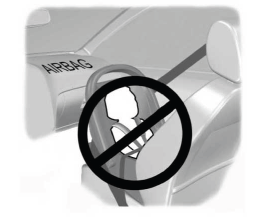
    Lincoln Aviator. Children and Airbags

    read more

     
    Copyright © 2026 www.liaviator2.com