
Lincoln Aviator 2020-2026 Owners Manual / Starting and Stopping the Engine / Starting a Gasoline Engine / Phone as a Key Backup Starting Passcode
Lincoln Aviator: Starting a Gasoline Engine / Phone as a Key Backup Starting Passcode
Note: In order to use the Backup Start Passcode feature, Phone as a Key must be active and enabled on at least one phone.
If you are unable to start your vehicle, do the following:
- Fully depress the brake pedal.
- SYNC displays the Backup Starting Passcode entry screen.
- Using the SYNC display enter the backup password and select Enter within 30 seconds.
- SYNC displays messages to start the vehicle.
- Fully depress the brake pedal and press the start button within 20 seconds to start the engine.
 Vehicles using Phone as a Key
Note: Do not touch the accelerator pedal.
Note: You must have your Phone as a Key
in your vehicle in order to shift the
transmission out of park (P)...
 Automatic Engine Shutdown
This feature shuts down the engine if it has
been idling for an extended period. The
ignition also turns off in order to save battery
power. Before your vehicle shuts down, a
message appears in the information display
showing a timer counting down from 30
seconds...
Other information:
Lincoln Aviator 2020-2026 Service Manual: Removal and Installation - Front Seat Cushion Cover - Vehicles With: Multi-Contour Seats
Removal Passenger seat Remove the OCS. Refer to: Occupant Classification System (OCS) Sensor - Vehicles With: Multi-Contour Seats (501-20B Supplemental Restraint System, Removal and Installation). Driver seat NOTE: Driver seat with power head restraint shown, other seats similar...
Lincoln Aviator 2020-2026 Service Manual: Description and Operation - Seatbelt Systems - System Operation and Component Description
System Operation Emergency Locking Retractor (ELR) All retractors have an Emergency Locking Retractor (ELR) mode, which is a vehicle-sensitive feature designed to activate and lock the seatbelt webbing during hard braking, cornering, or an impact of approximately 24 km/h (15 mph)...
Categories
- Manuals Home
- Lincoln Aviator Owners Manual
- Lincoln Aviator Service Manual
- Changing the Front Wiper Blades - Vehicles With: Heated Wiper Blades
- Child Safety Locks
- Configuring The Head Up Display
- New on site
- Most important about car
Fastening the Seatbelts
The front outboard and rear safety restraints in the vehicle are combination lap and shoulder belts.
Insert the belt tongue into the proper buckle (the buckle closest to the direction the tongue is coming from) until you hear a snap and feel it latch. Make sure that you securely fasten the tongue in the buckle.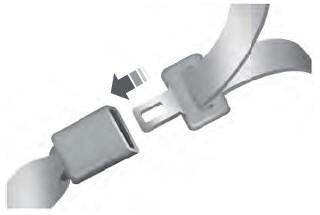

Copyright © 2026 www.liaviator2.com