
Lincoln Aviator 2020-2026 Service Manual / Electrical / Information and Entertainment Systems / Information and Entertainment System - General Information / Removal and Installation - Active Noise Control Microphone
Lincoln Aviator: Information and Entertainment System - General Information / Removal and Installation - Active Noise Control Microphone
Removal
-
Lower the headliner.
Refer to: Headliner - Lowering (501-05 Interior Trim and Ornamentation, Removal and Installation).
-
Disconnect the electrical connector, release the tabs and remove the ANC microphone.
.jpg) |
Installation
-
To install, reverse the removal procedure.
 General Procedures - Speaker Audio Test
Activation
NOTE:
The procedure used to download the audio files varies, depending on the web browser used.
Using a suitable web browser, download all of the diagnostic sound tracks to a suitable USB drive...
 Removal and Installation - AM/FM1 Antenna Amplifier
Removal
NOTE:
Removal steps in this procedure may contain installation details.
Remove the RH upper D-pillar trim panel.
Refer to: D-Pillar Trim Panel (501-05 Interior Trim and Ornamentation, Removal and Installation)...
Other information:
Lincoln Aviator 2020-2026 Service Manual: General Procedures - Body Panel Sectioning
Special Tool(s) / General Equipment Resistance Spotwelding Equipment Spherical Cutter Air Body Saw MIG/MAG Welding Equipment Locking Pliers Materials Name Specification Seam SealerTA-2-B, 3M™ 08308, LORD Fusor® 803DTM - Repair NOTICE: Do not carry out body side sectioning repairs in areas of door hinge, safety restraints or striker anchoring points...
Lincoln Aviator 2020-2026 Service Manual: Removal and Installation - Front Seat Backrest Blower Motor
Removal NOTE: Driver seat shown, passenger seat similar. Remove the front seat. Refer to: Front Seat (501-10A Front Seats, Removal and Installation). Remove the front seat backrest panel. Refer to: Front Seat Backrest Panel (501-10A Front Seats, Removal and Installation)...
Categories
- Manuals Home
- Lincoln Aviator Owners Manual
- Lincoln Aviator Service Manual
- Body and Paint
- Garage Door Opener
- Opening and Closing the Hood
- New on site
- Most important about car
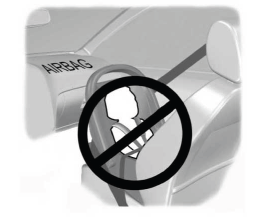
Children and Airbags
WARNING: Airbags can kill or injure a child in a child restraint. Never place a rear-facing child restraint in front of an active airbag. If you must use a forward-facing child restraint in the front seat, move the seat upon which the child restraint is installed all the way back.

Copyright © 2026 www.liaviator2.com