
Lincoln Aviator 2020-2026 Service Manual / Electrical / Information and Entertainment Systems / Information and Entertainment System - General Information / General Procedures - Speaker Audio Test
Lincoln Aviator: Information and Entertainment System - General Information / General Procedures - Speaker Audio Test
Activation
NOTE: The procedure used to download the audio files varies, depending on the web browser used.
-
Using a suitable web browser, download all of the diagnostic sound tracks to a suitable USB drive.
- 125Hz Sample
- 100Hz Sample
- 80Hz Sample
- 63Hz Sample
- 50Hz Sample
- 40Hz Sample
 General Procedures - SYNC Module [APIM] Programming
Programming
NOTE:
If a new APIM is being installed, install the new APIM before carrying out the following procedure.
If replacing the APIM do not connect the new APIM to a Wi-Fi network before completing scan tool APIM replacement programming as it may cause programming concerns...
 Removal and Installation - Active Noise Control Microphone
Removal
Lower the headliner.
Refer to: Headliner - Lowering (501-05 Interior Trim and Ornamentation, Removal and Installation).
Disconnect the electrical connector, release the tabs and remove the ANC microphone...
Other information:
Lincoln Aviator 2020-2026 Owners Manual: Alternative Engine Oil for Extremely Cold Climates
T..
Lincoln Aviator 2020-2026 Service Manual: Description and Operation - Second Row Climate Control - Overview
Overview The second row climate control system has components located in the center lower section of the climate control housing and floor console. The temperature and controls breakdown for the HVAC system is as follows, the first row driver, first row passenger, second row seating temperature and third row seating temperature...
Categories
- Manuals Home
- Lincoln Aviator Owners Manual
- Lincoln Aviator Service Manual
- Description and Operation - Jacking and Lifting
- Keyless Entry
- USB Port and Power Point Locations
- New on site
- Most important about car
Child Seats
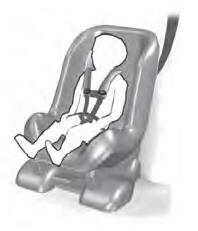
Use a child restraint (sometimes called an infant carrier, convertible seat, or toddler seat) for infants, toddlers and children weighing 40 lb (18 kg) or less (generally four-years-old or younger).
Using Lap and Shoulder Belts
WARNING: Do not place a rearward facing child restraint in front of an active airbag. Failure to follow this instruction could result in personal injury or death.

Copyright © 2026 www.liaviator2.com