
Lincoln Aviator 2020-2026 Service Manual / Body and Paint / Body and Paint / Handles, Locks, Latches and Entry Systems / Removal and Installation - Fuel Filler Door Latch
Lincoln Aviator: Handles, Locks, Latches and Entry Systems / Removal and Installation - Fuel Filler Door Latch
Removal
-
Remove the fuel filler door assembly.
Refer to: Fuel Filler Door Assembly (501-03 Body Closures, Removal and Installation).
-
Remove the fuel filler door latch.
-
Release the fuel filler door latch retaining tabs.
-
Remove the fuel filler door latch.
-
Release the fuel filler door latch retaining tabs.
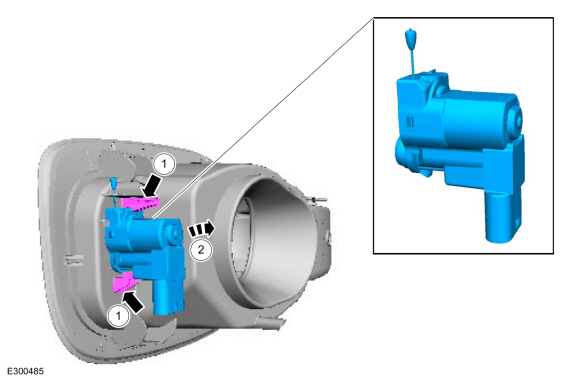 |
Installation
-
To install, reverse the removal procedure.
 Removal and Installation - Front Door Lock Control Switch
Special Tool(s) /
General Equipment
Interior Trim Remover
Removal
NOTE:
LH (left-hand) side shown, RH (right-hand) side similar.
Remove the driver door window control switch and bezel as an assembly...
 Removal and Installation - Hood Latch
Removal
NOTE:
Removal steps in this procedure may contain installation details.
Remove the pin-type retainers and the radiator sight shield...
Other information:
Lincoln Aviator 2020-2026 Owners Manual: Setting the Liftgate Open Height
Open the liftgate. Stop the liftgate movement by pressing the control button on the liftgate when it reaches the desired height.Note: Once the liftgate has stopped moving, you can also manually move it to the desired height. Press and hold the liftgate control button on the liftgate until you hear a tone, indicating programming is complete...
Lincoln Aviator 2020-2026 Owners Manual: Illuminated Entry
The interior lamps and some exterior lamps illuminate when you unlock the doors with the remote control. The illuminated entry system turns off the lights if: The ignition is on. You press the remote control lock button. After 25 seconds of illumination...
Categories
- Manuals Home
- Lincoln Aviator Owners Manual
- Lincoln Aviator Service Manual
- General Procedures - Transmission Fluid Drain and Refill
- Drive Modes
- Description and Operation - Jacking and Lifting
- New on site
- Most important about car
Child Safety Locks
When the child safety locks are set, you cannot open the rear doors from the inside.
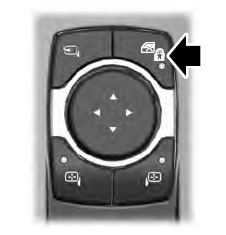
The child safety lock control is on the driver door.
Press the control to switch the child safety locks on. Press the control again to switch them off. A light on the child safety control illuminates when you switch them on.

Copyright © 2026 www.liaviator2.com