
Lincoln Aviator 2020-2026 Service Manual / Body and Paint / Body and Paint / Handles, Locks, Latches and Entry Systems / Removal and Installation - Hood Latch Release Handle
Lincoln Aviator: Handles, Locks, Latches and Entry Systems / Removal and Installation - Hood Latch Release Handle
Removal
-
Remove the hood latch release handle.
-
Rotate the hood latch release handle.
-
NOTE: Do not remove the retaining clip from the hood latch release handle.
Release the retaining clip.
-
Remove the hood latch release handle.
-
Rotate the hood latch release handle.
.jpg) |
Installation
-
To install, reverse the removal procedure.
 Removal and Installation - Hood Latch Release Cable
Removal
Front Cable
Remove the hood latch.
Refer to: Hood Latch (501-14 Handles, Locks, Latches and Entry Systems, Removal and Installation)...
 Removal and Installation - Interior Front Door Release Switch
Removal
NOTE:
LH (left-hand) side shown, RH (right-hand) side similar.
Remove the front door trim panel.
Refer to: Front Door Trim Panel (501-05 Interior Trim and Ornamentation, Removal and Installation)...
Other information:
Lincoln Aviator 2020-2026 Service Manual: General Procedures - Body Panel Sectioning
Special Tool(s) / General Equipment Resistance Spotwelding Equipment Spherical Cutter Air Body Saw MIG/MAG Welding Equipment Locking Pliers Materials Name Specification Seam SealerTA-2-B, 3M™ 08308, LORD Fusor® 803DTM - Repair NOTICE: Do not carry out body side sectioning repairs in areas of door hinge, safety restraints or striker anchoring points...
Lincoln Aviator 2020-2026 Owners Manual: Using Active Park Assist
The parking button is above the transmission selector, just below the display screen. Press the parking button then touch the Active Park Assist icon on the display screen to bring up full screen notifications. Touch the soft keys on the display screen to switch between Parallel Park In, Perpendicular Park In or Parallel Park Out parking modes...
Categories
- Manuals Home
- Lincoln Aviator Owners Manual
- Lincoln Aviator Service Manual
- Drive Modes
- Description and Operation - Jacking and Lifting
- Remove and Reinstall the Battery
- New on site
- Most important about car
Fastening the Seatbelts
The front outboard and rear safety restraints in the vehicle are combination lap and shoulder belts.
Insert the belt tongue into the proper buckle (the buckle closest to the direction the tongue is coming from) until you hear a snap and feel it latch. Make sure that you securely fasten the tongue in the buckle.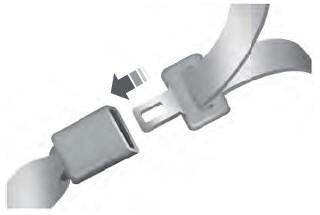

Copyright © 2026 www.liaviator2.com