
Lincoln Aviator 2020-2026 Service Manual / Body and Paint / Body and Paint / Body Closures / Removal and Installation - Liftgate
Lincoln Aviator: Body Closures / Removal and Installation - Liftgate
Removal
NOTE: Removal steps in this procedure may contain installation details.
-
Remove the liftgate trim panel.
Refer to: Liftgate Trim Panel (501-05 Interior Trim and Ornamentation, Removal and Installation).
-
Lower the headliner.
Refer to: Headliner - Lowering (501-05 Interior Trim and Ornamentation, Removal and Installation).
-
-
Remove the bolt.
Torque: 106 lb.in (12 Nm)
-
Disconnect the liftgate electrical connectors.
-
Disconnect the liftgate harness routing clips.
-
Remove the bolt.
.jpg) |
-
Disconnect the rear washer hose.
.jpg) |
-
Remove the grommet and route the harness out of the liftgate.
.jpg) |
-
Mark the location of the liftgate hinge bolts.
.jpg) |
-
NOTE: This step requires the aid of another technician.
On both sides.
Remove the clips holding the liftgate struts or the power liftgate motor and position aside.
.jpg) |
-
NOTE: This step requires the aid of another technician.
Remove the liftgate bolts and remove the liftgate from the vehicle.
Torque: 22 lb.ft (30 Nm)
.jpg) |
Installation
-
To install, reverse the removal procedure.
-
Align the liftgate as necessary.
Refer to: Liftgate Alignment (501-03 Body Closures, General Procedures).
Vehicles with power liftgate
-
Carry-out the power liftgate initialization.
Refer to: Power Liftgate Initialization (501-03 Body Closures, General Procedures).
 Removal and Installation - Hands-Free Liftgate Actuation Upper Sensor
Removal
NOTE:
Removal steps in this procedure may contain installation details.
Remove the rear bumper cover.
Refer to: Rear Bumper Cover (501-19 Bumpers, Removal and Installation)...
 Removal and Installation - Liftgate Anti-Pinch Switch
Removal
NOTE:
Removal steps in this procedure may contain installation details.
NOTE:
LH side shown, RH side similar.
Remove the liftgate trim panel...
Other information:
Lincoln Aviator 2020-2026 Owners Manual: Tire Rotation
WARNING: If the tire label shows different tire pressures for the front and rear tires and the vehicle has a tire pressure monitoring system, then you need to update the settings for the system sensors. Always perform the system reset procedure after tire rotation...
Lincoln Aviator 2020-2026 Service Manual: Description and Operation - Instrument Panel and Interior Switches Illumination - Overview
Overview Dimmable Illumination Dimmable illumination provides backlighting to switches and control components when the parking lamps are on. The instrument panel dimmer switch is used to increase or decrease the level of intensity for the dimmable backlit components...
Categories
- Manuals Home
- Lincoln Aviator Owners Manual
- Lincoln Aviator Service Manual
- Changing the Front Wiper Blades - Vehicles With: Heated Wiper Blades
- Remove and Reinstall the Battery
- Body and Paint
- New on site
- Most important about car
Fastening the Seatbelts
The front outboard and rear safety restraints in the vehicle are combination lap and shoulder belts.
Insert the belt tongue into the proper buckle (the buckle closest to the direction the tongue is coming from) until you hear a snap and feel it latch. Make sure that you securely fasten the tongue in the buckle.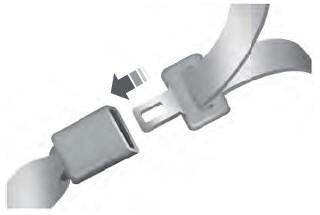

Copyright © 2026 www.liaviator2.com