
Lincoln Aviator 2020-2026 Service Manual / Powertrain / Automatic Transmission / Automatic Transmission - 10-Speed Automatic Transmission – 10R60 / Removal and Installation - Output Shaft Seal
Lincoln Aviator: Automatic Transmission - 10-Speed Automatic Transmission – 10R60 / Removal and Installation - Output Shaft Seal
Special Tool(s) / General Equipment
.jpg) |
100-001
(T50T-100-A)
Slide Hammer |
.jpg) |
205-1018 Installation Tube |
.jpg) |
307-309 Remover, Torque Converter Seal TKIT-1994-FMH/FLMH TKIT-1994-LMH/MH TKIT-1994-FH |
.jpg) |
307-782 Installer, Output Shaft Seal |
| Punch | |
Removal
-
With the vehicle in NEUTRAL, position it on a hoist.
Refer to: Jacking and Lifting (100-02 Jacking and Lifting, Description and Operation).
Rear Wheel Drive (RWD) vehicles
-
Remove the rear driveshaft.
Refer to: Rear Driveshaft (205-01 Driveshaft, Removal and Installation).
-
Remove the stakes from the output shaft flange retaining nut.
Use the General Equipment: Punch
.jpg) |
-
Remove and discard the output shaft flange nut (7K440).
.jpg) |
-
-
Index mark the output shaft to the flange.
-
Remove the output shaft flange.
-
Index mark the output shaft to the flange.
.jpg) |
Four-Wheel Drive (4WD) vehicles
-
Remove the transfer case assembly.
All vehicles
-
Using the special tools, remove and discard the output shaft seal (7052).
Use Special Service Tool: 100-001 (T50T-100-A) Slide Hammer. , 307-309 Remover, Torque Converter Seal.
.jpg) |
Installation
-
Position a new output shaft seal on the special tools.
Use Special Service Tool: 205-1018 Installation Tube. , 307-782 Installer, Output Shaft Seal.
.jpg) |
-
Using the special tools, install the new output shaft seal.
Use Special Service Tool: 205-1018 Installation Tube. , 307-782 Installer, Output Shaft Seal.
.jpg) |
Four-Wheel Drive (4WD) vehicles
-
Install the transfer case assembly.
Rear Wheel Drive (RWD) vehicles
-
NOTE: If the output shaft or output shaft flange are replaced with new parts, align lazer applied ink marks.
Align the index marks made during removal.
.jpg) |
-
Install the new output shaft flange retaining nut.
Torque: 59 lb.ft (80 Nm)
.jpg) |
-
After installing the new output shaft flange
retaining nut, stake the slots to prevent it from coming loose.
Use the General Equipment: Punch
|
-
Install the rear driveshaft.
Refer to: Rear Driveshaft (205-01 Driveshaft, Removal and Installation).
All vehicles
-
Check the transmission fluid level.
Refer to: Transmission Fluid Level Check (307-01A Automatic Transmission - 10-Speed Automatic Transmission – 10R60, General Procedures).
 Removal and Installation - Main Control Valve Body
Removal
NOTE:
The Solenoid Body Strategy Data Download procedure must be performed if a new main control valve body is installed.
Remove the transmission fluid pan gasket and filter...
 Removal and Installation - Output Shaft Speed (OSS) Sensor
Removal
Remove the main control valve body.
Refer to: Main Control Valve Body (307-01A Automatic Transmission - 10-Speed Automatic Transmission – 10R60, Removal and Installation)...
Other information:
Lincoln Aviator 2020-2026 Service Manual: Description and Operation - Noise, Vibration and Harshness (NVH)
Acceptable Noise, Vibration and Harshness (NVH) Noise is any undesirable sound, usually unpleasant in nature. Vibration is any motion, shaking or trembling, that can be felt or seen when an object moves back and forth or up and down. Harshness is a ride quality issue where the vehicle's response to the road transmits sharply to the customer...
Lincoln Aviator 2020-2026 Service Manual: Description and Operation - Perimeter Anti-Theft Alarm - Component Location
..
Categories
- Manuals Home
- Lincoln Aviator Owners Manual
- Lincoln Aviator Service Manual
- Remove and Reinstall the Battery
- Resetting the System
- Fuel Quality
- New on site
- Most important about car
Child Safety Locks
When the child safety locks are set, you cannot open the rear doors from the inside.
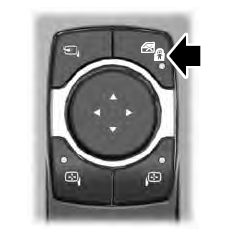
The child safety lock control is on the driver door.
Press the control to switch the child safety locks on. Press the control again to switch them off. A light on the child safety control illuminates when you switch them on.

Copyright © 2026 www.liaviator2.com