
Lincoln Aviator 2020-2026 Service Manual / Electrical / Lighting / Exterior Lighting / Removal and Installation - Rear Lamp Assembly
Lincoln Aviator: Exterior Lighting / Removal and Installation - Rear Lamp Assembly
Removal
NOTE: Removal steps in this procedure may contain installation details.
NOTE: LH lamp assembly shown, RH lamp assembly is similar.
-
Remove the rear bumper cover.
Refer to: Rear Bumper Cover (501-19 Bumpers, Removal and Installation).
-
Remove the loadspace trim panel.
Refer to: Loadspace Trim Panel (501-05 Interior Trim and Ornamentation, Removal and Installation).
-
Remove the rear lamp assembly side screw.
Torque: 22 lb.in (2.5 Nm)
.jpg) |
-
Disconnect the rear lamp assembly electrical connector.
.jpg) |
-
Position the rear lamp assembly.
-
Remove the rear lamp assembly screws.
Torque: 17 lb.in (1.9 Nm)
-
Using a non-marring tool, release the rear lamp assembly retainer pin outward.
-
Gently pull the rear lamp assembly away from the vehicle.
-
Remove the rear lamp assembly screws.
.jpg) |
-
Detach the rubber grommet and remove the rear lamp assembly.
.jpg) |
Installation
-
To install, reverse the removal procedure.
 Removal and Installation - Light Sensor
Removal
NOTE:
Removal steps in this procedure may contain installation details.
Using a non-marring tool release and position the light sensor...
 Removal and Installation - Reversing Lamp
Removal
NOTE:
Removal steps in this procedure may contain installation details.
Remove the liftgate trim panel.
Refer to: Liftgate Trim Panel (501-05 Interior Trim and Ornamentation, Removal and Installation)...
Other information:
Lincoln Aviator 2020-2026 Owners Manual: Resetting the System
Simultaneously press and hold the seek up and the audio unit power buttons until the screen goes black. Wait three minutes to allow the system to complete the reset. Press the audio unit power button to switch the system on. Note: You can reset the system to restore functionality that has stopped working...
Lincoln Aviator 2020-2026 Owners Manual: Memory Function
WARNING: Before activating the memory seat, make sure that the area immediately surrounding the seat is clear of obstructions and that all occupants are clear of moving parts. WARNING: Do not use the memory function when your vehicle is moving. This feature recalls the position of the following: Driver seat...
Categories
- Manuals Home
- Lincoln Aviator Owners Manual
- Lincoln Aviator Service Manual
- Tire Change Procedure
- Wireless Accessory Charger (If Equipped)
- Garage Door Opener
- New on site
- Most important about car
Adjusting the Steering Wheel - Vehicles With: Manual Adjustable Steering Column
WARNING: Do not adjust the steering wheel when your vehicle is moving.
Note: Make sure that you are sitting in the correct position.
Unlock the steering column. Adjust the steering wheel to the desired position.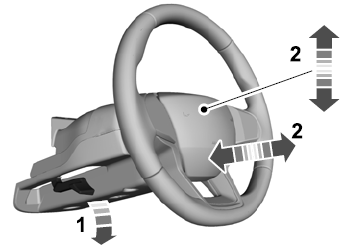

Copyright © 2026 www.liaviator2.com