
Lincoln Aviator 2020-2026 Service Manual / Electrical / Lighting / Exterior Lighting / Removal and Installation - Light Sensor
Lincoln Aviator: Exterior Lighting / Removal and Installation - Light Sensor
Removal
NOTE: Removal steps in this procedure may contain installation details.
-
Using a non-marring tool release and position the light sensor.
.jpg) |
-
Disconnect the electrical connector and remove the light sensor.
.jpg) |
Installation
-
To install, reverse the removal procedure.
 Removal and Installation - Light Emitting Diode (LED) Control Module
Removal
NOTE:
The high series headlamp assembly comes with two light
emitting diode (LED) control modules. The low series with one light
emitting diode (LED) control module...
 Removal and Installation - Rear Lamp Assembly
Removal
NOTE:
Removal steps in this procedure may contain installation details.
NOTE:
LH lamp assembly shown, RH lamp assembly is similar.
Remove the rear bumper cover...
Other information:
Lincoln Aviator 2020-2026 Service Manual: Diagnosis and Testing - Seatbelt Systems
Symptom Chart(s) Preliminary Inspection Diagnostics in this manual assume a certain skill level and knowledge of Ford-specific diagnostic practices. REFER to: Diagnostic Methods (100-00 General Information, Description and Operation). Before diagnosing or repairing the seatbelt system, inspect the following items: Seatbelt webbing integrity (torn, frayed, cut or stretched) Seatbelt buckle and tongue assembly (latching and release, foreign debris) Symptom Chart: Seatbelt System Symptom Chart Condition Action The seatbelt warning indicator does not operate GO to Pinpoint Test A The seatbelt warning chime does not operate GO to Pinpoint Test B The seatbelt retractor webbing does not extract or exhibits excessive pressure on the occupant during use GO to Pinpoint Test C The seatbelt retractor webbing does not retract or has excessive slack during use GO to Pinpoint Test C The Belt-Minder® feature is inoperative GO to Pinpoint Test D The seatbelt tongue is rotated on the seatbelt webbing GO to Pinpoint Test E The seatbelt webbing is twisted at the seatbelt guide GO to Pinpoint Test E The seatbelt webbing is dirty or soiled GO to Pinpoint Test E Pinpoint Tests PINPOINT TEST A : THE SEATBELT WARNING INDICATOR DOES NOT OPERATE Normal Operation and Fault Conditions Turn the ignition on and monitor the airbag warning indicator after the IPC proves out...
Lincoln Aviator 2020-2026 Owners Manual: Front Parking Aid
WARNING: The system may not detect objects with surfaces that absorb reflection. Always drive with due care and attention. Failure to take care may result in a crash. WARNING: The system may not detect small or moving objects, particularly those close to the ground...
Categories
- Manuals Home
- Lincoln Aviator Owners Manual
- Lincoln Aviator Service Manual
- Fuel Quality
- Child Safety Locks
- Body and Paint
- New on site
- Most important about car
Activating Intelligent Access
The intelligent access key must be within 3 ft (1 m) of the door or luggage compartment you intend to lock or unlock.
At a Door
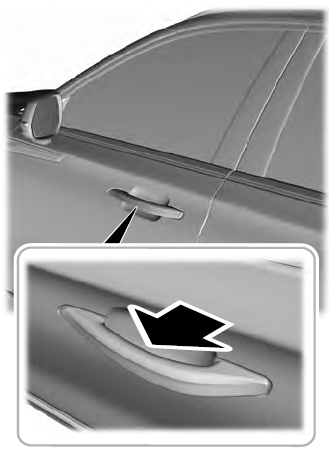
Electronic door handles are on each door. Gently depress the switch inside the exterior door handle to unlock and open the door. An unlock symbol illuminates on the door window trim indicating your vehicle is unlocked.

Copyright © 2026 www.liaviator2.com