Lincoln Aviator: Apps / SiriusXM Traffic and Travel Link (If Equipped)
WARNING: Driving while distracted
can result in loss of vehicle control, crash
and injury. We strongly recommend that
you use extreme caution when using any
device that may take your focus off the
road. Your primary responsibility is the safe
operation of your vehicle. We recommend
against the use of any hand-held device
while driving and encourage the use of
voice-operated systems when possible.
Make sure you are aware of all applicable
local laws that may affect the use of
electronic devices while driving.
Note: SiriusXM Traffic and Travel Link may
not be available in all markets.
Note: In order to use SiriusXM Traffic and
Travel Link, your vehicle must have
navigation.
Note: A paid subscription is required to
access and use these features. Go to
www.siriusxm.com/travellink for more
information.
Note: Visit www.siriusxm.com/traffic and click
on Coverage map and details for a complete
listing of all traffic areas covered by SiriusXM
Traffic and Travel Link.
Note: Neither Sirius nor Ford is responsible
for any errors or inaccuracies in the SiriusXM
Traffic and Travel Link services or its use in
vehicles.
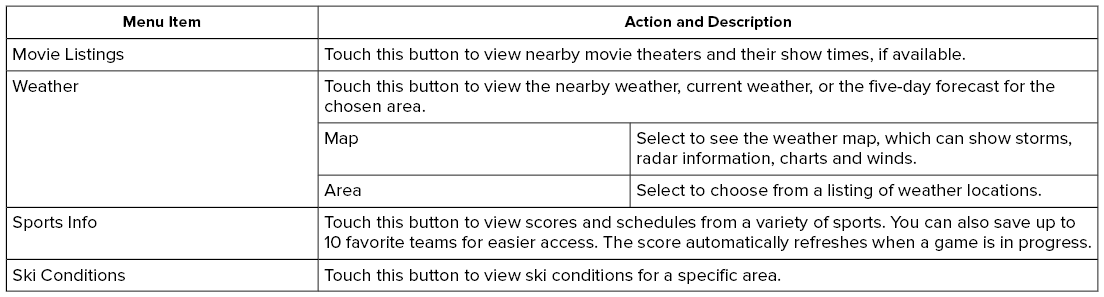
When you subscribe to SiriusXM Traffic and
Travel Link, it can help you locate the best
gas prices, find movie listings, get current
traffic alerts, view the current weather map,
get accurate ski conditions and see scores
to current sports games.


Connect your device to a USB port.
Switch Android Auto off.
Switch on Enable Mobile Apps via USB
in the Mobile Apps Settings tile.
Select the apps option on the feature bar...
Press the button to enter the
settings menu.
Once you select a tile, press
the
button next to a menu item to view
an explanation of the feature or
setting...
Other information:
Leak detection
NOTE:
This test is meant to be a secondary check after a service
procedure is performed on the high voltage battery when a seal is
disturbed. It is important to follow the workshop manual service
procedure to verify a high voltage battery is sealed correctly...
Diagnostic Trouble Code (DTC) Chart
Diagnostics in this manual assume a certain skill level and knowledge of Ford-specific diagnostic practices. REFER to: Diagnostic Methods (100-00 General Information, Description and Operation).
Diagnostic Trouble Code Chart
Module
DTC
Description
Action
BCM
B1551:51
Phone As A Key: Not Programmed
GO to Pinpoint Test G
BCM
B155E:00
Incorrect Response from Immobilizer SubControl Module: No Sub Type Information
GO to Pinpoint Test M
RFA
B1589:29
Antenna #3: Signal Invalid
GO to Pinpoint Test A
RFA
B1589:31
Antenna #3: No Signal
GO to Pinpoint Test A
RFA
B1589:45
Antenna #3: Program Memory Failure
GO to Pinpoint Test A
RFA
B1589:49
Antenna #3: Internal Electronic Failure
GO to Pinpoint Test A
RFA
B1589:57
Antenna #3: Invalid/ Incompatible Software Component
GO to Pinpoint Test A
RFA
B1590:29
Antenna #4: Signal Invalid
GO to Pinpoint Test A
RFA
B1590:31
Antenna #4: No Signal
GO to Pinpoint Test A
RFA
B1590:45
Antenna #4: Program Memory Failure
GO to Pinpoint Test A
RFA
B1590:49
Antenna #4: Internal Electronic Failure
GO to Pinpoint Test A
RFA
B1590:57
Antenna #4: Invalid/ Incompatible Software Component
GO to Pinpoint Test A
RFA
B1591:29
Antenna #5: Signal Invalid
GO to Pinpoint Test B
RFA
B1591:31
Antenna #5: No Signal
GO to Pinpoint Test B
RFA
B1591:45
Antenna #5: Program Memory Failure
GO to Pinpoint Test B
RFA
B1591:49
Antenna #5: Internal Electronic Failure
GO to Pinpoint Test B
RFA
B1591:57
Antenna #5: Invalid/ Incompatible Software Component
GO to Pinpoint Test B
RFA
B1592:29
Antenna #6: Signal Invalid
GO to Pinpoint Test B
RFA
B1592:31
Antenna #6: No Signal
GO to Pinpoint Test B
RFA
B1592:45
Antenna #6: Program Memory Failure
GO to Pinpoint Test B
RFA
B1592:49
Antenna #6: Internal Electronic Failure
GO to Pinpoint Test B
RFA
B1592:57
Antenna #6: Invalid/ Incompatible Software Component
GO to Pinpoint Test B
RFA
B1593:29
Antenna #7: Signal Invalid
GO to Pinpoint Test C
RFA
B1593:31
Antenna #7: No Signal
GO to Pinpoint Test C
RFA
B1593:45
Antenna #7: Program Memory Failure
GO to Pinpoint Test C
RFA
B1593:49
Antenna #7: Internal Electronic Failure
GO to Pinpoint Test C
RFA
B1593:57
Antenna #7: Invalid/ Incompatible Software Component
GO to Pinpoint Test C
RFA
B1594:29
Antenna #8: Signal Invalid
GO to Pinpoint Test B
RFA
B1594:31
Antenna #8: No Signal
GO to Pinpoint Test B
RFA
B1594:45
Antenna #8: Program Memory Failure
GO to Pinpoint Test B
RFA
B1594:49
Antenna #8: Internal Electronic Failure
GO to Pinpoint Test B
RFA
B1594:57
Antenna #8: Invalid/ Incompatible Software Component
GO to Pinpoint Test B
RFA
B1595:29
Antenna #9: Signal Invalid
GO to Pinpoint Test C
RFA
B1595:31
Antenna #9: No Signal
GO to Pinpoint Test C
RFA
B1595:45
Antenna #9: Program Memory Failure
GO to Pinpoint Test C
RFA
B1595:49
Antenna #9: Internal Electronic Failure
GO to Pinpoint Test C
RFA
B1595:57
Antenna #9: Invalid/ Incompatible Software Component
GO to Pinpoint Test C
RFA
B1596:29
Antenna #10: Signal Invalid
GO to Pinpoint Test C
RFA
B1596:31
Antenna #10: No Signal
GO to Pinpoint Test C
RFA
B1596:45
Antenna #10: Program Memory Failure
GO to Pinpoint Test C
RFA
B1596:49
Antenna #10: Internal Electronic Failure
GO to Pinpoint Test C
RFA
B1596:57
Antenna #10: Invalid/ Incompatible Software Component
GO to Pinpoint Test C
RFA
B1597:29
Antenna #11: Signal Invalid
GO to Pinpoint Test D
RFA
B1597:31
Antenna #11: No Signal
GO to Pinpoint Test D
RFA
B1597:45
Antenna #11: Program Memory Failure
GO to Pinpoint Test D
RFA
B1597:49
Antenna #11: Internal Electronic Failure
GO to Pinpoint Test D
RFA
B1597:57
Antenna #11: Invalid/ Incompatible Software Component
GO to Pinpoint Test D
RFA
B15A5:56
Bluetooth Low Energy Module: Invalid/ Incompatible Configuration
GO to Pinpoint Test E
RFA
B1A56:29
Antenna: Signal Invalid
GO to Pinpoint Test A
RFA
B1A56:31
Antenna: No Signal
GO to Pinpoint Test A
RFA
B1A56:45
Antenna: Program Memory Failure
GO to Pinpoint Test A
RFA
B1A56:49
Antenna: Internal Electronic Failure
GO to Pinpoint Test A
RFA
B1A56:57
Antenna: Invalid/ Incompatible Software Component
GO to Pinpoint Test A
RFA
B1D55:29
Antenna #2: Signal Invalid
GO to Pinpoint Test D
RFA
B1D55:31
Antenna #2: No Signal
GO to Pinpoint Test D
RFA
B1D55:45
Antenna #2: Program Memory Failure
GO to Pinpoint Test D
RFA
B1D55:49
Antenna #2: Internal Electronic Failure
GO to Pinpoint Test D
RFA
B1D55:57
Antenna #2: Invalid/ Incompatible Software Component
GO to Pinpoint Test D
RFA
P0601:41
Internal Control Module Memory Checksum Error: General Checksum Failure
GO to Pinpoint Test K
RFA
P1269:00
Immobilizer Code Not Programmed: No Sub Type Information
GO to Pinpoint Test G
RFA
P1602:00
Immobilizer/ ECM Communication Error: No Sub Type Information
GO to Pinpoint Test G
RFA
P1622:00
Immobilizer ID Does Not Match: No Sub Type Information
GO to Pinpoint Test G
RFA
P1623:00
Immobilizer Code Word/ID Number Write Failure: No Sub Type Information
GO to Pinpoint Test G
RFA
U0146:08
Lost Communication With Gateway "A": Bus Signal/Message Failure
GO to Pinpoint Test L
RFA
U0198:00
Lost Communication With Telematic Control Module: No Sub Type Information
GO to Pinpoint Test L
RFA
U0422:00
Invalid Data Received From Body Control Module: No Sub Type Information
GO to Pinpoint Test G
RFA
U200D:11
Control Module Output Power A: Circuit Short to Ground
GO to Pinpoint Test A
RFA
U200D:15
Control Module Output Power A: Circuit Short to Battery or Open
GO to Pinpoint Test A
RFA
U200E:11
Control Module Output Power B: Circuit Short to Ground
GO to Pinpoint Test B
RFA
U200E:15
Control Module Output Power B: Circuit Short to Battery or Open
GO to Pinpoint Test B
RFA
U200F:11
Control Module Output Power C: Circuit Short to Ground
GO to Pinpoint Test C
RFA
U200F:15
Control Module Output Power C: Circuit Short to Battery or Open
GO to Pinpoint Test C
RFA
U201A:06
Control Module Main Calibration Data: Algorithm Based Failure
GO to Pinpoint Test F
RFA
U201A:46
Control Module Main Calibration Data: Calibration/ Parameter Memory failure
GO to Pinpoint Test F
RFA
U201A:55
Control Module Main Calibration Data: Not Configured
GO to Pinpoint Test F
RFA
U2100:55
Initial Configuration Not Complete: Not Configured
GO to Pinpoint Test F
RFA
U3000:42
Control Module: General Memory Failure
GO to Pinpoint Test K
RFA
U3000:44
Control Module: Data Memory Failure
GO to Pinpoint Test K
RFA
U3000:49
Control Module: Internal Electronic Failure
GO to Pinpoint Test K
RFA
U3003:16
Battery Voltage: Circuit Voltage Below Threshold
GO to Pinpoint Test I
RFA
U3003:17
Battery Voltage: Circuit Voltage Above Threshold
GO to Pinpoint Test J
Symptom Chart
Symptom Chart: PATS
Diagnostics in this manual assume a certain skill level and knowledge of Ford-specific diagnostic practices...