
Lincoln Aviator: Principle of Operation / Standard Settings
Not every vehicle includes the features listed below. If your vehicle has this equipment, then you cannot change the following settings when using a MyKey:
- Seatbelt reminder or Belt-Minder™. MyKey
mutes the audio system until drivers, and
in some instances, passengers, fasten
their seatbelts.
Note: If your vehicle includes an AM/FM radio or a very basic audio system, then the radio may not mute.
- Earlier low-fuel warning. The low-fuel warning activates earlier for MyKey drivers, giving them more time to refuel.
- Certain driver alerts, stability systems or parking aids turn on automatically when you use the MyKey system. For example, Blind Spot Information System (BLIS), cross traffic alert, lane departure warning or forward collision warning.
Note: MyKey drivers may be able to turn the lane departure warning feature off, but this feature turns back on automatically with every new key cycle.
- Restricted touchscreen operation in some markets. For example, MyKey may prevent manual navigation destination input while the vehicle is in any gear other than park (P) or when the vehicle reaches a certain rate of speed.
- Satellite radio adult content restrictions, if this feature is available in your market.
 Principle of Operation
MyKey allows you to program keys with
restricted driving modes to promote good
driving habits. You can program the
restrictions to all keys except one...
 Optional Settings
You can configure certain vehicle feature
settings when you first create a MyKey. You
can also change the settings afterward with
an admin key...
Other information:
Lincoln Aviator 2020-2026 Service Manual: Removal and Installation - Passive Anti-Theft System (PATS) Center Antenna
Special Tool(s) / General Equipment Pick Hook Interior Trim Remover Removal NOTE: Front seats removed for clarity. Remove the FCIMB. Refer to: Front Controls Interface Module B (FCIMB) (415-00 Information and Entertainment System - General Information, Removal and Installation)...
Lincoln Aviator 2020-2026 Service Manual: Removal and Installation - Second Row Single Seat Backrest Cover - Vehicles With: Second Row Captain Chairs
Special Tool(s) / General Equipment Interior Trim Remover Removal NOTE: LH (left hand) seat shown, RH (right hand) seat similar. Remove the second row seat. Refer to: Second Row Seat - Vehicles With: Second Row Captain Chairs (501-10B Second Row Seats, Removal and Installation)...
Categories
- Manuals Home
- Lincoln Aviator Owners Manual
- Lincoln Aviator Service Manual
- Interior Lamps
- Description and Operation - Jacking and Lifting
- Configuring The Head Up Display
- New on site
- Most important about car
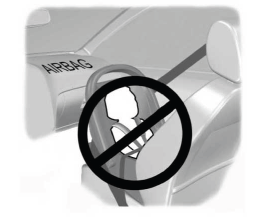
Children and Airbags
WARNING: Airbags can kill or injure a child in a child restraint. Never place a rear-facing child restraint in front of an active airbag. If you must use a forward-facing child restraint in the front seat, move the seat upon which the child restraint is installed all the way back.

Copyright © 2026 www.liaviator2.com