
Lincoln Aviator: Towing / Towing a Trailer

WARNING: Towing trailers beyond the maximum recommended gross trailer weight exceeds the limit of your vehicle and could result in engine damage, transmission damage, structural damage, loss of vehicle control, vehicle rollover and personal injury.

WARNING: Do not exceed the GVWR or the GAWR specified on the certification label.

Your vehicle may have electrical items, such as fuses or relays, related to towing.

Your vehicle's load capacity designation is by weight, not by volume, so you cannot necessarily use all available space when loading a vehicle or trailer.

Towing a trailer places an extra load on your vehicle's engine, transmission, axle, brakes, tires and suspension. Inspect these components periodically during, and after, any towing operation.

Load Placement

To help minimize how trailer movement affects your vehicle when driving:

  • Load the heaviest items closest to the trailer floor.
  • Load the heaviest items centered between the left and right side trailer tires.
  • Load the heaviest items above the trailer axles or just slightly forward toward the trailer tongue. Do not allow the final trailer tongue weight to go above or below 10-15% of the loaded trailer weight.
  • Select a ball mount with the correct rise or drop and load capacity. When both the loaded vehicle and trailer are connected, the trailer frame should be level, or slightly angled down toward your vehicle, when viewed from the side.

When driving with a trailer or payload, a slight takeoff vibration or shudder may be present due to the increased payload weight. Additional information regarding proper trailer loading and setting your vehicle up for towing is located in another chapter of this manual.

You can also find information in the RV & Trailer Towing Guide available at your authorized dealer, or online.

Lincoln Aviator. Towing a Trailer

    Towing

    ..

    Trailer Sway Control (If Equipped)

    WARNING: Turning off trailer sway control increases the risk of loss of vehicle control, serious injury or death. Ford does not recommend disabling this feature except in situations where speed reduction may be detrimental (such as hill climbing), the driver has significant trailer towing experience, and can control trailer sway and maintain safe operation...

    Other information:

    Lincoln Aviator 2020-2026 Service Manual: Removal and Installation - Instrument Panel


    Special Tool(s) / General Equipment Interior Trim Remover Removal NOTE: Removal steps in this procedure may contain installation details. Drain the cooling system. Refer to: Engine Cooling System Draining, Vacuum Filling and Bleeding (303-03A Engine Cooling - 3...

    Lincoln Aviator 2020-2026 Service Manual: Diagnosis and Testing - Interior Lighting


    Diagnostic Trouble Code (DTC) Chart Diagnostics in this manual assume a certain skill level and knowledge of Ford-specific diagnostic practices. REFER to: Diagnostic Methods (100-00 General Information, Description and Operation).   Diagnostic Trouble Code Chart Module   DTC Description Action   BCM B1175:01 Driver Door Ajar Switch:General Electrical Failure If the courtesy lamps are inoperative, GO to Pinpoint Test A   BCM B1175:01 Driver Door Ajar Switch:General Electrical Failure If the courtesy lamps are always on, GO to Pinpoint Test C   BCM B1176:01 Passenger Door Ajar Switch:General Electrical Failure If the courtesy lamps are inoperative, GO to Pinpoint Test A   BCM B1176:01 Passenger Door Ajar Switch:General Electrical Failure If the courtesy lamps are always on, GO to Pinpoint Test C   BCM B11C0:01 Driver Side Rear Door Ajar Switch:General Electrical Failure If the courtesy lamps are inoperative, GO to Pinpoint Test A   BCM B11C0:01 Driver Side Rear Door Ajar Switch:General Electrical Failure If the courtesy lamps are always on, GO to Pinpoint Test C   BCM B11C1:01 Passenger Side Rear Door Ajar Switch:General Electrical Failure If the courtesy lamps are inoperative, GO to Pinpoint Test A   BCM B11C1:01 Passenger Side Rear Door Ajar Switch:General Electrical Failure If the courtesy lamps are always on, GO to Pinpoint Test C   BCM B12C2:11 Puddle Lamp:Circuit Short To Ground   GO to Pinpoint Test H   BCM B12C2:15 Puddle Lamp:Circuit Short To Battery or Open   GO to Pinpoint Test H   BCM B1306:01 Liftgate Ajar Switch:General Electrical Failure   GO to Pinpoint Test K   BCM B1306:11 Liftgate Ajar Switch:Circuit Short To Ground   GO to Pinpoint Test K   BCM B1313:11 Interior Lighting Output:Circuit Short To Ground   GO to Pinpoint Test B   BCM B1313:15 Interior Lighting Output:Circuit Short To Battery or Open If the courtesy lamps are always on, GO to Pinpoint Test B   BCM B1313:15 Interior Lighting Output:Circuit Short To Battery or Open If the courtesy lamps are always on, GO to Pinpoint Test D   BCM B145C:11 Ambient Lighting Power Supply Output:Circuit Short To Ground   GO to Pinpoint Test I   BCM B145C:15 Ambient Lighting Power Supply Output:Circuit Short To Battery or Open   GO to Pinpoint Test I   BCM B1465:00 Ambient Lighting Bus 1:No Sub Type Information If all the ambient lighting is inoperative, always on or does not change color/intensity, GO to Pinpoint Test I   BCM B1465:00 Ambient Lighting Bus 1:No Sub Type Information If one or more of the ambient lighting Light Emitting Diodes (LEDs) are inoperative or do not change color/intensity, GO to Pinpoint Test J   BCM B1465:96 Ambient Lighting Bus 1:Component Internal Failure If all the ambient lighting is inoperative, always on or does not change color/intensity, GO to Pinpoint Test I   BCM B1465:96 Ambient Lighting Bus 1:Component Internal Failure If one or more of the ambient lighting Light Emitting Diodes (LEDs) are inoperative or do not change color/intensity, GO to Pinpoint Test J   BCM B1467:00 Ambient Lighting Bus 3:No Sub Type Information If all the ambient lighting is inoperative, always on or does not change color/intensity, GO to Pinpoint Test I   BCM B1467:00 Ambient Lighting Bus 3:No Sub Type Information If one or more of the ambient lighting Light Emitting Diodes (LEDs) are inoperative or do not change color/intensity, GO to Pinpoint Test J   BCM B1467:96 Ambient Lighting Bus 3:Component Internal Failure If all the ambient lighting is inoperative, always on or does not change color/intensity, GO to Pinpoint Test I   BCM B1467:96 Ambient Lighting Bus 3:Component Internal Failure If one or more of the ambient lighting Light Emitting Diodes (LEDs) are inoperative or do not change color/intensity, GO to Pinpoint Test J   BCM B14AA:11 Demand Lamp Output:Circuit Short To Ground   GO to Pinpoint Test E   BCM B14AA:15 Demand Lamp Output:Circuit Short To Battery or Open   GO to Pinpoint Test E   BCM B153C:11 Color Ambient Light Output:Circuit Short To Ground   GO to Pinpoint Test I   BCM B153C:15 Color Ambient Light Output:Circuit Short To Battery or Open   GO to Pinpoint Test I   DCME B1175:19 Drivers Door Ajar Switch:Circuit Current Above Threshold   GO to Pinpoint Test C   DCMF B1176:19 Passenger Door Ajar Switch:Circuit Current Above Threshold   GO to Pinpoint Test C   DCMG B11C0:19 Driver Side Rear Door Ajar Switch:Circuit Current Above Threshold   GO to Pinpoint Test C   DCMH B11C1:19 Passenger Side Rear Door Ajar Switch:Circuit Current Above Threshold   GO to Pinpoint Test C   DDM B1165:11 Left Front Puddle Lamp Output:Circuit Short To Ground   GO to Pinpoint Test G   DDM B1165:15 Left Front Puddle Lamp Output:Circuit Short To Battery Or Open   GO to Pinpoint Test G   PDM B1166:11 Right Front Puddle Lamp Output:Circuit Short To Ground   GO to Pinpoint Test G   PDM B1166:15 Right Front Puddle Lamp Output:Circuit Short To Battery Or Open   GO to Pinpoint Test G   RGTM B1306:12 Liftgate Ajar Switch:Circuit Short To Battery   GO to Pinpoint Test C Symptom Chart(s) Diagnostics in this manual assume a certain skill level and knowledge of Ford-specific diagnostic practices...

    Categories

    Activating Intelligent Access

    The intelligent access key must be within 3 ft (1 m) of the door or luggage compartment you intend to lock or unlock.

    At a Door

    Electronic door handles are on each door. Gently depress the switch inside the exterior door handle to unlock and open the door. An unlock symbol illuminates on the door window trim indicating your vehicle is unlocked.
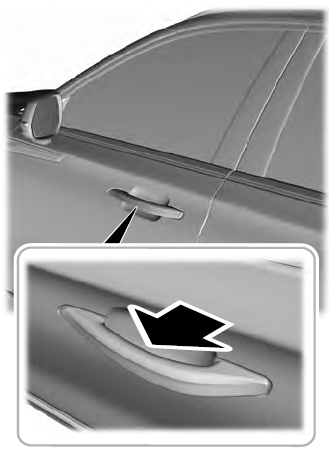
    Lincoln Aviator. Activating Intelligent Access

    read more

     
    Copyright © 2026 www.liaviator2.com