
Lincoln Aviator: Entertainment / USB Ports
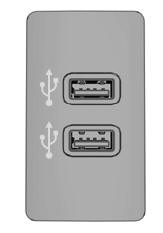
The USB ports are in the center console or behind a small access door in the instrument panel.
This feature allows you to plug in USB media devices, memory sticks, flash drives or thumb drives, and charge devices if they support this feature.
Select this option to play audio from your USB device.
Apps
The system supports the use of certain audio apps such as iHeartRadio through a USB or Bluetooth enabled device.
Each app gives you different on-screen options depending on the app's content.
Supported Media Players, Formats and Metadata Information
The system is capable of hosting nearly any digital media player, including iPod, iPhone, and most USB drives.
Supported audio formats include MP3, WMA, WAV, AAC, and FLAC.
Supported audio file extensions include MP3, WMA, WAV, M4A, M4B, AAC, and FLAC.
Supported USB file systems include: FAT, exFAT, and NTFS.
SYNC 3 is also able to organize the media from your USB device by metadata tags. Metadata tags, which are descriptive software identifiers embedded in the media files, provide information about the file.
If your indexed media files contain no information embedded in these metadata tags, SYNC 3 may classify the empty metadata tags as unknown.
SYNC 3 is capable of indexing up to 50,000 songs per USB device, for up to 10 devices.
 Bluetooth Stereo or USB
Bluetooth Stereo and USB allow you to
access media that you store on your
Bluetooth device or USB device such as
music, audio books or podcasts.
The following buttons are available for Bluetooth and USB:
You can use the forward, reverse, pause or
play buttons to control the audio playback...
 Climate
Touch the climate button on the touchscreen
to access your climate control features.
Note: You can switch temperature units
between Fahrenheit and Celsius...
Other information:
Lincoln Aviator 2020-2026 Owners Manual: Changing the Engine Air Filter
WARNING: To reduce the risk of vehicle damage and personal burn injuries, do not start your engine with the air cleaner removed and do not remove it while the engine is running. When changing the engine air filter, do not allow debris or foreign material to enter the air induction system...
Lincoln Aviator 2020-2026 Service Manual: Description and Operation - F Clutch
Overview Item Description 1 SSF 2 F clutch control valve 3 F clutch latch valve 4 F clutch apply circuit 5 F clutch piston 6 F clutch assembly 7 Ring gear No...
Categories
- Manuals Home
- Lincoln Aviator Owners Manual
- Lincoln Aviator Service Manual
- Interior Lamps
- Description and Operation - Body and Frame
- General Procedures - Transmission Fluid Drain and Refill
- New on site
- Most important about car
Child Safety Locks
When the child safety locks are set, you cannot open the rear doors from the inside.
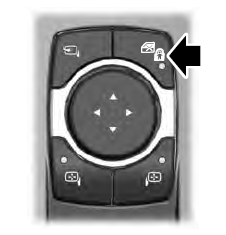
The child safety lock control is on the driver door.
Press the control to switch the child safety locks on. Press the control again to switch them off. A light on the child safety control illuminates when you switch them on.
