
Lincoln Aviator: Rear Seats / Adjusting the Third Row Power Seats
WARNING: Do not fold a seat if it is occupied. Failure to follow this instruction could result in personal injury.
WARNING: Do not place cargo or any objects behind the seatback before returning it to the original position.
WARNING: Do not drive your vehicle with a seat that is unlatched or in the folded position. Failure to follow this instruction could result in personal injury or death in the event of a sudden stop or crash.
Note: The power rear seat functions disable 10 minutes after you switch the ignition off. The transmission must be in park (P) and the liftgate must be open to operate the seats.
The control buttons are inside the liftgate area.
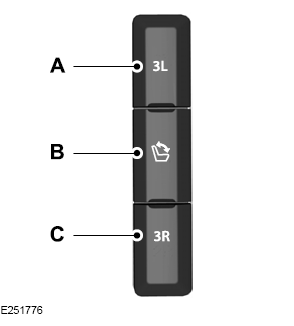
- Press to fold the left-hand third row seat.
- Press to fold and unfold both third row seats.
- Press to fold the right-hand third row seat.
To return the third-row seat backrest to the original position, press the corresponding control again.
If the seats are inoperable, do the following:
- Make sure that the engine is running and the tailgate is open.
- Make sure that there are no objects on the seats that would prevent them from folding completely.
- Press and hold button B for one minute until both seats completely fold and unfold.
- Press button A and button C to confirm each seat is operational.
Note: During this procedure, the seat may appear to be fully unfolded. Continue holding the switch for a few seconds.
If the power rear seat disables after 10 minutes, you can enable the seat by:
- Opening any door.
- Pressing the unlock button on the key fob.
- Pressing any keyless entry keypad button.
- Switching the ignition on.
 Adjusting the Second Row Seats for Easy Entry
WARNING: Do not drive your vehicle
with a seat that is unlatched or in the
folded position. Failure to follow this
instruction could result in personal injury
or death in the event of a sudden stop or
crash...
 Heated Seats
WARNING: Use caution when using
the heated seat if you are unable to feel
pain to your skin because of advanced
age, chronic illness, diabetes, spinal cord
injury, medication, alcohol use, exhaustion
or other physical conditions...
Other information:
Lincoln Aviator 2020-2026 Owners Manual: Starting, Driving and Stopping
Starting When you start your vehicle, a green READY indicator light appears in the instrument cluster letting you know that your vehicle is ready for driving. The engine may not start because your vehicle has a silent key start feature. This fuel saving feature allows your vehicle to be ready to drive without requiring the gas engine to be running...
Lincoln Aviator 2020-2026 Service Manual: Diagnosis and Testing - Diagnostic Strategy
Overview The diagnostic process for each transmission concern will vary depending on the symptoms and condition of the vehicle. The diagnostic process below is an efficient method to collect as much data as possible about the concern before performing a repair or removing the transmission from the vehicle for teardown and further inspection...
Categories
- Manuals Home
- Lincoln Aviator Owners Manual
- Lincoln Aviator Service Manual
- Configuring The Head Up Display
- Disabling Auto-Start-Stop
- Opening and Closing the Hood
- New on site
- Most important about car
Emergency Locking
Each door has a backup power system which allows the door to function if your vehicle has no power. The system has a limited number of operations before the power is depleted and turns off. When the system turns off, the door remains open and unlatched and does not close.
If your vehicle has no power and the backup power system is turned off, you can close and secure your vehicle by manually resetting each door latch using a key in the position shown.
