Lincoln Aviator: General Information / All-wheel drive system (if equipped)
WARNING: Do not become overconfident in the ability of four-wheel drive vehicles. Although a four-wheel drive vehicle may accelerate better than a two-wheel drive vehicle in low traction situations, it won't stop any faster than two-wheel drive vehicles. Always drive at a safe speed.
A vehicle equipped with all-wheel drive has the ability to use all four wheels to power itself. This increases traction which may enable you to safely drive over terrain and road conditions that a conventional two-wheel drive vehicle cannot. Power is supplied to all four wheels through a transfer case operation and drive mode selection. You should become thoroughly familiar with this information before you operate your vehicle.
Some limited All Wheel Drive (AWD) traction may be provided if a temporary spare is installed on one of the front wheels. If you are in driving conditions where limited All Wheel Drive (AWD) traction needed while a temporary wheel is installed, it is recommended the temporary spare be installed on the front axle.
For all-wheel-drive vehicles, a spare tire of a different size other than the tire provided should never be used. A dissimilar spare tire size; other than the spare tire provided or major dissimilar tire sized between the front and rear axles could cause the all-wheel-drive system to stop functioning and default to rear-wheel drive.
 Notice to utility vehicle and truck owners
WARNING: Vehicles with a higher
center of gravity (utility and four-wheel
drive vehicles) handle differently than
vehicles with a lower center of gravity
(passenger cars)...
 How your vehicle differs from other vehicles
Sport utility vehicles and trucks can differ
from some other vehicles in a few noticeable
ways. Your vehicle could be:
Higher - to allow higher load carrying
capacity and to allow it to travel over
rough terrain without getting hung up or
damaging underbody components...
Other information:
Lincoln Aviator 2020-2026 Service Manual: Specifications
Capacities Item Specification Material: Motorcraft® SAE 75W-85 Premium Synthetic Hypoid Gear Lubricant / XY-75W85-QL (WSS-M2C942-A) 1.77L (3.74 pt) (to the bottom of the filler hole) Material: Motorcraft® Premium Long-Life Grease / XG-1-E1 (ESA-M1C75-B) – Material: Motorcraft® High Performance Engine RTV Silicone / TA-357 (WSE-M4G323-A6) – Material: Motorcraft® Ultra Silicone Sealant / TA-29 (WSS-M4G323-A8) - General Specifications Item Specification Ring gear backlash 0...
Lincoln Aviator 2020-2026 Owners Manual: Activating the Manual Park Release Cable
Apply the parking brake.Note: If vehicle battery is dead, for example, no electrical power is available, you could require an external power source to apply the parking brake. Using the key or a flat head screwdriver 4.7 in (120 mm), carefully open the access cover under the arm rest console...
Categories
- Manuals Home
- Lincoln Aviator Owners Manual
- Lincoln Aviator Service Manual
- Description and Operation - Jacking and Lifting
- Child Safety Locks
- Body and Paint
- New on site
- Most important about car
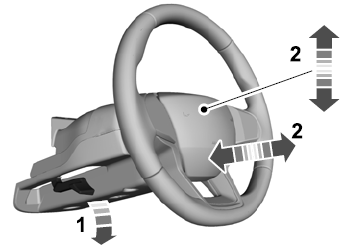
Adjusting the Steering Wheel - Vehicles With: Manual Adjustable Steering Column
WARNING: Do not adjust the steering wheel when your vehicle is moving.
Note: Make sure that you are sitting in the correct position.
Unlock the steering column. Adjust the steering wheel to the desired position.