Lincoln Aviator: Windows and Mirrors / Exterior Mirrors
Power Exterior Mirrors
WARNING: Do not adjust the mirrors when your vehicle is moving. This could result in the loss of control of your vehicle, serious personal injury or death.
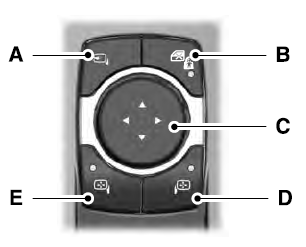
- Power-folding mirror control.
- Window lockout.
- Adjustment control.
- Right-hand mirror.
- Left-hand mirror.
Switch your vehicle on to adjust the mirrors. With the ignition in accessory mode or the engine running:
- Select the mirror you want to adjust. The control lights.
- Use the adjustment control to adjust the position of the mirror.
- Press the mirror control again. The control light turns off.
Fold-Away Exterior Mirrors
Push the mirror toward the door window glass. Make sure that you fully engage the mirror in its support when returning it to its original position.
Auto-Folding Exterior Mirrors
The exterior mirrors fold in toward the glass after you place the transmission into park (P), switch off the vehicle, open and close the driver side door and lock the vehicle. The exterior mirrors unfold and return to their driving position after you unlock the vehicle and open and close the driver side door.
You can switch this feature on and off through the touchscreen.
You can fold the mirrors on demand by pressing the power-folding mirror control on the door. The control lights and the mirrors fold in toward the glass. Press the control again to unfold the mirrors. The control light turns off.
Note: If you use the power-folding control to fold the mirrors on demand with the auto fold feature on, you must use the control again to unfold them.
Loose Mirror
If you manually fold your power-folding mirrors, they may not work properly even after you re-position them. You need to reset them if:
- The mirrors vibrate when you drive.
- The mirrors feel loose.
- The mirrors do not stay in the folded or unfolded position.
- One of the mirrors is not in its normal driving position.
To reset the power-fold feature, use the power-folding mirror control to fold and unfold the mirrors. You may hear a loud noise as you reset the power-folding mirrors. This sound is normal. Repeat this process as needed each time you manually fold the mirrors.
Memory Mirrors
You can save and recall the mirror positions through the memory function.
Auto-dimming Feature
The driver exterior mirror dims when the interior auto-dimming mirror turns on.
Direction Indicator Mirrors
When the vehicle is running, the forward-facing portion of the appropriate mirror housing blinks when you switch on the direction indicator.
Lincoln Welcome Mat Projection Lamp
The lamps on the bottom part of the exterior mirror lower housing light when you use your transmitter to unlock the doors or when you open a door.
 Global Opening and Closing
You can use the remote control to open the
windows with the ignition off.
Note: You can enable or disable this feature
in the information display or see an
authorized dealer...
 Interior Mirror
WARNING: Do not adjust the mirrors
when your vehicle is moving. This could
result in the loss of control of your vehicle,
serious personal injury or death...
Other information:
Lincoln Aviator 2020-2026 Service Manual: Description and Operation - Airbag and Seatbelt Pretensioner Supplemental Restraint System (SRS) - System Operation and Component Description
System Operation System Diagram - Supplemental Restraint System (SRS) Item Description 1 RCM 2 Ignition Switch 3 GWM 4 Driver Seatbelt Buckle Switch 5 Passenger Seatbelt Buckle Switch 6 RHFront Impact Severity Sensor 7 Driver Door Side Impact Sensor 8 Driver C-Pillar Side Impact Sensor 9 Passenger Belt Tension Sensor (BTS) 10 Passenger Seat Position Sensor 11 Driver Seat Position Sensor 12 APIM 13 Passenger Door Side Impact Sensor 14 BCM 15 Driver Second Row Seatbelt Buckle Switch 16 Passenger Second Row Seatbelt Buckle Switch 17 LH Front Impact Severity Sensor 18 OCSM 19 Center Second Row Seatbelt Buckle Switch 20 Passenger C-Pillar Side Impact Sensor 21 Driver Third Row Seatbelt Buckle Switch 22 Passenger Third Row Seatbelt Buckle Switch 23 IPC Item Description 1 Passenger Seatbelt Anchor Pretensioner 2 Driver Seatbelt Anchor Pretensioner 3 Driver Seatbelt Retractor Pretensioner 4 Passenger Side Curtain Airbag 5 Driver Side Curtain Airbag 6 Passenger Side Airbag 7 Driver Side Airbag 8 Passenger Airbag (Stages 1 and 2) 9 Driver Airbag (Stages 1 and 2) 10 RCM 11 BCM 12 Passenger Seatbelt Adaptive Load Limiter 13 Passenger Seatbelt Retractor Pretensioner 14 Passenger Load Limiting Retractor 15 Passenger Airbag Vent (if equipped) 16 Passenger Knee Airbag 17 Driver Knee Airbag 18 Driver Second Row Seatbelt Retractor 19 Passenger Second Row Seatbelt Retractor Network Message Chart - Supplemental Restraint System (SRS) Module Network Input Messages - RCM Broadcast Message Originating Module Message Purpose eCall confirmation APIM Used for SYNC® 911 Assist™ operation...
Lincoln Aviator 2020-2026 Service Manual: Removal and Installation - Transfer Case Front Output Shaft Seal
Special Tool(s) / General Equipment 205-1018Installation Tube 205-1067Installer, Output Shaft AWD Removal With the vehicle in NEUTRAL, position it on a hoist. Refer to: Jacking and Lifting (100-02 Jacking and Lifting, Description and Operation)...
Categories
- Manuals Home
- Lincoln Aviator Owners Manual
- Lincoln Aviator Service Manual
- Resetting the System
- General Procedures - Transmission Fluid Drain and Refill
- Description and Operation - Body and Frame
- New on site
- Most important about car
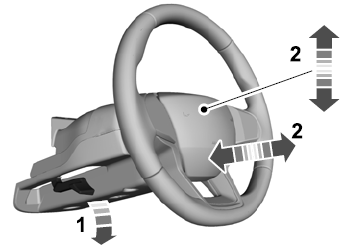
Adjusting the Steering Wheel - Vehicles With: Manual Adjustable Steering Column
WARNING: Do not adjust the steering wheel when your vehicle is moving.
Note: Make sure that you are sitting in the correct position.
Unlock the steering column. Adjust the steering wheel to the desired position.