
Lincoln Aviator 2020-2026 Service Manual / Powertrain / Automatic Transmission / Automatic Transmission - 10-Speed Automatic Transmission – 10R60 / General Procedures - Adaptive Learning Drive Cycle
Lincoln Aviator: Automatic Transmission - 10-Speed Automatic Transmission – 10R60 / General Procedures - Adaptive Learning Drive Cycle
Programming
NOTE: Perform the adaptive learning drive cycle on a level road surface.
-
Using the scan tool, clear the DTCs (Diagnostic Trouble Codes) and Transmission Adaptive Tables.
-
Drive the vehicle until the engine and transmission reach normal operating temperature.
-
Accelerate from a stop with light throttle (15%)
ensuring that upshifts 1st through 8th occur at engine speeds between
1300-1600 rpm.
-
Continue to accelerate (may apply slightly more throttle
after 7-8 upshift at 32-38 mph (51-61 km/h) until you achieve 55 mph
(88 km/h) and the 8-9 and 9-10 shifts complete.
-
Brake very gently to a complete stop and hold foot on brake for five (5) seconds.
-
Shift the transmission to Neutral. Wait 1 second.
-
Shift the transmission to Reverse. Wait 2 seconds.
-
Shift the transmission to Neutral. Wait 1 second.
-
Shift the transmission to Drive. Wait 2 seconds.
-
Repeat Steps 3 through 9 six additional times.
 Diagnosis and Testing - Torque Converter Clutch (TCC)
Symptom Chart
Torque Converter Clutch (TCC)
For torque converter operation, REFER to: Torque Converter (307-01A Automatic Transmission - 10-Speed Automatic Transmission – 10R60, Description and Operation)...
 General Procedures - Transmission Fluid Drain and Refill
Special Tool(s) /
General Equipment
307-570Tube, Transmission FillTKIT-2006U-F/FMTKIT-2006U-FLM/LMTKIT-2006U-ROW1TKIT-2006U-ROW2
Fluid Suction Gun
Materials
Name
Specification
Motorcraft® MERCON® ULV Automatic Transmission FluidXT-12-QULV
WSS-M2C949-A, MERCON® ULV
Draining
NOTE:
It is not necessary to remove the transmission fluid filter to drain the transmission fluid...
Other information:
Lincoln Aviator 2020-2026 Owners Manual: Unlatching the Driver Door with the Key Blade
If your vehicle has no power and the backup power system is turned off, you can manually unlatch the driver door using a key in the position shown. Remove the key blade from the transmitter. Insert the key blade into the lock cylinder. Turn the key clockwise to unlatch the driver door...
Lincoln Aviator 2020-2026 Service Manual: Removal and Installation - Fuel Pump and Sender Unit
Special Tool(s) / General Equipment 310-123Locking Ring, Fuel TankTKIT-2004J-FTKIT-2005U-LM Removal WARNING: Do not smoke, carry lighted tobacco or have an open flame of any type when working on or near any fuel-related component...
Categories
- Manuals Home
- Lincoln Aviator Owners Manual
- Lincoln Aviator Service Manual
- Body and Paint
- Configuring The Head Up Display
- Opening and Closing the Hood
- New on site
- Most important about car
Remote Control
Passive Key
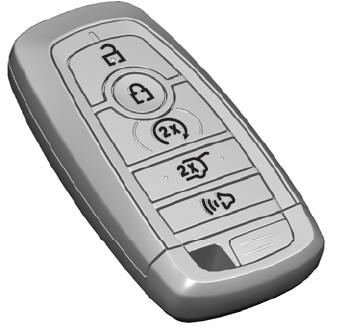
The passive key operates the power locks and the remote start system. The passive key must be in your vehicle to use the push button start.
Note: You may not be able to shift out of park (P) unless the passive key is inside your vehicle.

Copyright © 2026 www.liaviator2.com