
Lincoln Aviator 2020-2026 Service Manual / Powertrain / Fuel System - General Information / Fuel System - General Information - 3.0L EcoBoost / General Procedures - Fuel Tank Draining
Lincoln Aviator: Fuel System - General Information - 3.0L EcoBoost / General Procedures - Fuel Tank Draining
Special Tool(s) / General Equipment
.jpg) |
292-00004 Fuel Tanker 100 GPM |
Draining
.jpg)
.jpg)
.jpg)
-
Refer to: Gasoline and Gasoline-Ethanol Fuel Systems Health and Safety Precautions (100-00 General Information, Description and Operation)..jpg) WARNING:
Before beginning any service procedure in this
section, refer to Safety Warnings in section 100-00 General Information.
Failure to follow this instruction may result in serious personal
injury.
WARNING:
Before beginning any service procedure in this
section, refer to Safety Warnings in section 100-00 General Information.
Failure to follow this instruction may result in serious personal
injury.
-
With the vehicle in NEUTRAL, position it on a hoist.
Refer to: Jacking and Lifting (100-02 Jacking and Lifting, Description and Operation).
-
Disconnect the battery ground cable.
Refer to: Battery Disconnect and Connect (414-01 Battery, Mounting and Cables, General Procedures).
-
.jpg)
.jpg)
NOTICE: Only use the specified general equipment.
NOTE: Be prepared to collect escaping fulid
Loosen the clamp and disconnect the hose. Position the hose aside.
Torque: 28 lb.in (3.2 Nm)
.jpg) |
-
NOTICE: Use suitable paper to absorb any escaping fluid.
NOTE: Some residual fuel may remain in the fuel tank filler pipe. Carefully drain into a suitable container.
Insert the hose from the fuel storage tanker and siphon the fuel through the hose.
Use Special Service Tool: 292-00004 Fuel Tanker 100 GPM.
.jpg) |
 General Procedures - Fuel System Pressure Check
Special Tool(s) /
General Equipment
310-D009
(D95L-7211-A)
Fuel Pressure Test Kit
Check
NOTE:
This Fuel System Pressure Check is for the low pressure side of the system...
 General Procedures - Spring Lock Couplings
Special Tool(s) /
General Equipment
310-250Disconnect Tool, Fuel LineTKIT-2012A-FLTKIT-2012A-ROW
Disconnect
NOTICE:
When reusing liquid or vapor tube connectors, make sure to
use compressed air to remove any foreign material from the connector
retaining clip area before separating from the tube or damage to the
tube or connector retaining clip can occur...
Other information:
Lincoln Aviator 2020-2026 Owners Manual: Driving on Snow and Ice
WARNING: If you are driving in slippery conditions that require tire chains or cables, then it is critical that you drive cautiously. Keep speeds down, allow for longer stopping distances and avoid aggressive steering to reduce the chances of a loss of vehicle control which can lead to serious injury or death...
Lincoln Aviator 2020-2026 Service Manual: Removal and Installation - Fuel Filler Door Assembly - Plug-In Hybrid Electric Vehicle (PHEV)
Special Tool(s) / General Equipment Flat Headed Screw Driver Knife Removal NOTE: Removal steps in this procedure may contain installation details. NOTE: The fuel filler door assembly is damaged during the removal process and requires a new fuel filler door assembly installed...
Categories
- Manuals Home
- Lincoln Aviator Owners Manual
- Lincoln Aviator Service Manual
- Changing the Front Wiper Blades - Vehicles With: Heated Wiper Blades
- Description and Operation - Jacking and Lifting
- Tire Change Procedure
- New on site
- Most important about car
Adjusting the Steering Wheel - Vehicles With: Manual Adjustable Steering Column
WARNING: Do not adjust the steering wheel when your vehicle is moving.
Note: Make sure that you are sitting in the correct position.
Unlock the steering column. Adjust the steering wheel to the desired position.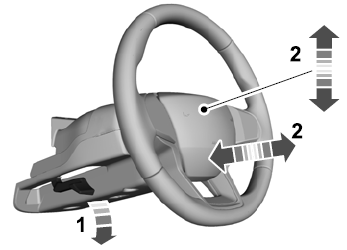

Copyright © 2026 www.liaviator2.com