
Lincoln Aviator: Body Closures / General Procedures - Hood Alignment

Adjustment

NOTE: Removal steps in this procedure may contain installation details.

All alignments

  1. Remove the hood latch.
    Refer to: Hood Latch (501-14 Handles, Locks, Latches and Entry Systems, Removal and Installation).
  1. Remove the nuts and the striker assembly.
    Torque: 80 lb.in (9 Nm)

Hood fore and aft, left and right alignments

  1. Detach the struts and loosen the nuts to permit movement of the hood.
    Loosen:
       :   2 turn(s)
  1. Carefully close the hood.
  1. Adjust the hood as required.
  1. Carefully open the hood.
  1. Tighten the nuts install the Hood struts.
    Torque: 18 lb.ft (25 Nm)

Hood front up and down alignments

  1. Adjust the bump stop rubbers.
  1. Adjust the hood as required.

All alignments

  1. Install the striker assembly.
    Torque: 80 lb.in (9 Nm)
  1. Loosen the nuts to permit movement of the striker assembly.
    Loosen:
       :   2 turn(s)
  1. Tighten the nuts.
    Torque: 80 lb.in (9 Nm)
  1. Inspect the body-to-hood alignment.
  1. Install the removed components.

    General Procedures - Front Door Alignment

    Adjustment NOTE: Removal steps in this procedure may contain installation details. NOTE: LH side shown, RH side similar. All alignments Open the door...

    General Procedures - Liftgate Alignment

    Special Tool(s) / General Equipment Interior Trim Remover Materials Name Specification Seam SealerTA-2-B, 3M™ 08308, LORD Fusor® 803DTM -  Adjustment NOTE: Removal steps in this procedure may contain installation details...

    Other information:

    Lincoln Aviator 2020-2026 Service Manual: General Procedures - Head Up Display (HUD) Module Calibration


    Special Tool(s) / General Equipment 501-418Calibration Target - NO STEP File Available 501-421Eye Box Adjustment NOTE: If it is necessary to cancel any calibration adjustment use the return button to cancel the current adjustment...

    Lincoln Aviator 2020-2026 Service Manual: Diagnosis and Testing - Interior Lighting


    Diagnostic Trouble Code (DTC) Chart Diagnostics in this manual assume a certain skill level and knowledge of Ford-specific diagnostic practices. REFER to: Diagnostic Methods (100-00 General Information, Description and Operation).   Diagnostic Trouble Code Chart Module   DTC Description Action   BCM B1175:01 Driver Door Ajar Switch:General Electrical Failure If the courtesy lamps are inoperative, GO to Pinpoint Test A   BCM B1175:01 Driver Door Ajar Switch:General Electrical Failure If the courtesy lamps are always on, GO to Pinpoint Test C   BCM B1176:01 Passenger Door Ajar Switch:General Electrical Failure If the courtesy lamps are inoperative, GO to Pinpoint Test A   BCM B1176:01 Passenger Door Ajar Switch:General Electrical Failure If the courtesy lamps are always on, GO to Pinpoint Test C   BCM B11C0:01 Driver Side Rear Door Ajar Switch:General Electrical Failure If the courtesy lamps are inoperative, GO to Pinpoint Test A   BCM B11C0:01 Driver Side Rear Door Ajar Switch:General Electrical Failure If the courtesy lamps are always on, GO to Pinpoint Test C   BCM B11C1:01 Passenger Side Rear Door Ajar Switch:General Electrical Failure If the courtesy lamps are inoperative, GO to Pinpoint Test A   BCM B11C1:01 Passenger Side Rear Door Ajar Switch:General Electrical Failure If the courtesy lamps are always on, GO to Pinpoint Test C   BCM B12C2:11 Puddle Lamp:Circuit Short To Ground   GO to Pinpoint Test H   BCM B12C2:15 Puddle Lamp:Circuit Short To Battery or Open   GO to Pinpoint Test H   BCM B1306:01 Liftgate Ajar Switch:General Electrical Failure   GO to Pinpoint Test K   BCM B1306:11 Liftgate Ajar Switch:Circuit Short To Ground   GO to Pinpoint Test K   BCM B1313:11 Interior Lighting Output:Circuit Short To Ground   GO to Pinpoint Test B   BCM B1313:15 Interior Lighting Output:Circuit Short To Battery or Open If the courtesy lamps are always on, GO to Pinpoint Test B   BCM B1313:15 Interior Lighting Output:Circuit Short To Battery or Open If the courtesy lamps are always on, GO to Pinpoint Test D   BCM B145C:11 Ambient Lighting Power Supply Output:Circuit Short To Ground   GO to Pinpoint Test I   BCM B145C:15 Ambient Lighting Power Supply Output:Circuit Short To Battery or Open   GO to Pinpoint Test I   BCM B1465:00 Ambient Lighting Bus 1:No Sub Type Information If all the ambient lighting is inoperative, always on or does not change color/intensity, GO to Pinpoint Test I   BCM B1465:00 Ambient Lighting Bus 1:No Sub Type Information If one or more of the ambient lighting Light Emitting Diodes (LEDs) are inoperative or do not change color/intensity, GO to Pinpoint Test J   BCM B1465:96 Ambient Lighting Bus 1:Component Internal Failure If all the ambient lighting is inoperative, always on or does not change color/intensity, GO to Pinpoint Test I   BCM B1465:96 Ambient Lighting Bus 1:Component Internal Failure If one or more of the ambient lighting Light Emitting Diodes (LEDs) are inoperative or do not change color/intensity, GO to Pinpoint Test J   BCM B1467:00 Ambient Lighting Bus 3:No Sub Type Information If all the ambient lighting is inoperative, always on or does not change color/intensity, GO to Pinpoint Test I   BCM B1467:00 Ambient Lighting Bus 3:No Sub Type Information If one or more of the ambient lighting Light Emitting Diodes (LEDs) are inoperative or do not change color/intensity, GO to Pinpoint Test J   BCM B1467:96 Ambient Lighting Bus 3:Component Internal Failure If all the ambient lighting is inoperative, always on or does not change color/intensity, GO to Pinpoint Test I   BCM B1467:96 Ambient Lighting Bus 3:Component Internal Failure If one or more of the ambient lighting Light Emitting Diodes (LEDs) are inoperative or do not change color/intensity, GO to Pinpoint Test J   BCM B14AA:11 Demand Lamp Output:Circuit Short To Ground   GO to Pinpoint Test E   BCM B14AA:15 Demand Lamp Output:Circuit Short To Battery or Open   GO to Pinpoint Test E   BCM B153C:11 Color Ambient Light Output:Circuit Short To Ground   GO to Pinpoint Test I   BCM B153C:15 Color Ambient Light Output:Circuit Short To Battery or Open   GO to Pinpoint Test I   DCME B1175:19 Drivers Door Ajar Switch:Circuit Current Above Threshold   GO to Pinpoint Test C   DCMF B1176:19 Passenger Door Ajar Switch:Circuit Current Above Threshold   GO to Pinpoint Test C   DCMG B11C0:19 Driver Side Rear Door Ajar Switch:Circuit Current Above Threshold   GO to Pinpoint Test C   DCMH B11C1:19 Passenger Side Rear Door Ajar Switch:Circuit Current Above Threshold   GO to Pinpoint Test C   DDM B1165:11 Left Front Puddle Lamp Output:Circuit Short To Ground   GO to Pinpoint Test G   DDM B1165:15 Left Front Puddle Lamp Output:Circuit Short To Battery Or Open   GO to Pinpoint Test G   PDM B1166:11 Right Front Puddle Lamp Output:Circuit Short To Ground   GO to Pinpoint Test G   PDM B1166:15 Right Front Puddle Lamp Output:Circuit Short To Battery Or Open   GO to Pinpoint Test G   RGTM B1306:12 Liftgate Ajar Switch:Circuit Short To Battery   GO to Pinpoint Test C Symptom Chart(s) Diagnostics in this manual assume a certain skill level and knowledge of Ford-specific diagnostic practices...

    Categories

    Child Safety Locks

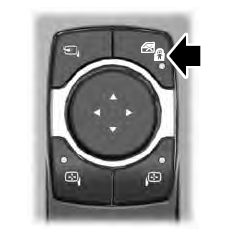
    When the child safety locks are set, you cannot open the rear doors from the inside.
    Lincoln Aviator. Child Safety Locks

    The child safety lock control is on the driver door.

    Press the control to switch the child safety locks on. Press the control again to switch them off. A light on the child safety control illuminates when you switch them on.

    read more

     
    Copyright © 2026 www.liaviator2.com