Lincoln Aviator: Interior Air Quality / Refreshing the Interior Air
Manually Refreshing the Interior Air (If Equipped)
- Press MENU on the climate control unit.
- Press Cabin Refresh on the touchscreen.
Note: Climate control settings could change for about 90 seconds to help flow outside air into the cabin. You can change the blower motor speed to the settings you prefer.
Automatically Refreshing the Interior Air (If Equipped)
If the cabin air recirculates continuously for longer than 35 minutes, climate control settings could change automatically for about 90 seconds to help flow outside air into the cabin.
Refreshing the Interior Air Upon Start If the cabin is above a certain high temperature while parked for over 30 minutes, when you start the engine the climate control system settings could change for approximately 60 seconds to help flow outside air into the cabin.
Note: The system is not designed to cool the interior air temperature.
Auto Air Refresh Hints (If Equipped)
To further improve the quality of air in the cabin:
Adjust the windows and other cabin openings such as the moonroof.
- Switch recirculated air on or off.
- Manually refresh the interior air.
- Adjust the blower motor speed.
- Replace the cabin air filter at regular intervals.
 Auto Air Refresh Indicators (If Equipped)
The indicator area is on the touchscreen
feature bar and displays one of the following:
Indicates blower motor is on for
filtering and PM2.5 is low.
Indicates the blower motor is on
for filtering...
 Interior Air Quality – Troubleshooting
Interior Air Quality – Information Messages (If Equipped)
Note: Depending on your vehicle options,
not all messages display or are available.
Certain messages may be abbreviated or
shortened depending upon which cluster
type you have...
Other information:
Lincoln Aviator 2020-2026 Service Manual: Removal and Installation - Second Row Air Distribution Door Actuator
Removal NOTE: Removal steps in this procedure may contain installation details. Remove the floor console. Refer to: Floor Console (501-12 Instrument Panel and Console, Removal and Installation). Remove the bolts and the duct section...
Lincoln Aviator 2020-2026 Service Manual: Description and Operation - Airbag and Seatbelt Pretensioner Supplemental Restraint System (SRS) - Component Location
..
Categories
- Manuals Home
- Lincoln Aviator Owners Manual
- Lincoln Aviator Service Manual
- Description and Operation - Jacking and Lifting
- Description and Operation - Body and Frame
- Remove and Reinstall the Battery
- New on site
- Most important about car
Children and Airbags
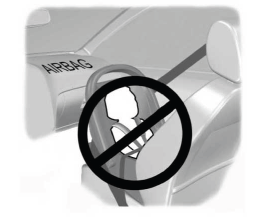
WARNING: Airbags can kill or injure a child in a child restraint. Never place a rear-facing child restraint in front of an active airbag. If you must use a forward-facing child restraint in the front seat, move the seat upon which the child restraint is installed all the way back.