
Lincoln Aviator: Interior Air Quality

What Is the Cabin Air Filter

The cabin air filter improves the quality of air in your vehicle by trapping dust, pollen and other particles.

Remote Start

The climate control system adjusts the interior temperature during remote start. You can switch this feature on or off and adjust the settings using the touchscreen...

Replacing the Cabin Air Filter

Replace the filter at regular intervals. The cabin air filter is behind the glove compartment. To remove the lower glove compartment and access the filter: Open the glove compartment...

Other information:

Lincoln Aviator 2020-2026 Service Manual: General Procedures - Refrigerant Identification Testing - Vehicles With: R134A Refrigerant


Special Tool(s) / General Equipment Refrigerant Identification Equipment Activation NOTE: Use Refrigerant Identification Equipment to identify gas samples taken directly from the refrigeration system or storage containers prior to recovering or charging the refrigerant system...

Lincoln Aviator 2020-2026 Service Manual: Diagnosis and Testing - External Controls


Diagnostic Trouble Code (DTC) Chart Diagnostics in this manual assume a certain skill level and knowledge of Ford-specific diagnostic practices. REFER to: Diagnostic Methods (100-00 General Information, Description and Operation).   Diagnostic Trouble Code Chart Module   DTC Description Action   GSM P0562:00 System Voltage Low: No Sub Type Information   GO to Pinpoint Test B   GSM P0563:00 System Voltage High: No Sub Type Information   GO to Pinpoint Test C   GSM P0605:00 Internal Control Module Read Only Memory (ROM) Error: No Sub Type Information   GO to Pinpoint Test L   GSM P0606:00 Control Module Processor: No Sub Type Information   GO to Pinpoint Test L   GSM P0607:00 Control Module Performance: No Sub Type Information   GO to Pinpoint Test L   GSM P06B8:00 Internal Control Module Non-Volatile Random Access Memory (NVRAM) Error: No Sub Type Information   GO to Pinpoint Test L   GSM P07EC:00 Transmission Range Multi-Function Select Circuit: No Sub Type Information   GO to Pinpoint Test J   GSM P07ED:00 Transmission Range Multi-Function Select Circuit Stuck: No Sub Type Information   GO to Pinpoint Test J   GSM P0814:00 Transmission Range Display Circuit: No Sub Type Information   GO to Pinpoint Test I   GSM P164E:00 Internal Control Module Transmission Range Select Performance: No Sub Type Information   GO to Pinpoint Test L   GSM P166B:00 Drivers Door Status Correlation: No Sub Type Information   GO to Pinpoint Test H   GSM U0100:00 Lost Communication With ECM/PCM "A": No Sub Type Information   GO to Pinpoint Test G   GSM U0100:87 Lost Communication With ECM/PCM "A": Missing Message   GO to Pinpoint Test G   GSM U0121:00 Lost Communication With Anti-Lock Brake System (ABS) Control Module "A": No Sub Type Information   GO to Pinpoint Test F   GSM U0140:00 Lost Communication With Body Control Module: No Sub Type Information   GO to Pinpoint Test E   GSM U0155:00 Lost Communication With Instrument Panel Cluster (IPC) Control Module: No Sub Type Information   GO to Pinpoint Test D   GSM U0203:00 Lost Communication With Door Control Module "E": No Sub Type Information   GO to Pinpoint Test H   GSM U0301:00 Software Incompatibility with ECM/PCM: No Sub Type Available   GO to Pinpoint Test M   GSM U0401:00 Invalid Data Received from ECM/PCM A: No Sub Type Information   GO to Pinpoint Test N   GSM U0422:00 Invalid Data Received From Body Control Module: No Sub Type Information   GO to Pinpoint Test N   GSM U0504:00 Invalid Data Received From Door Control Module "E": No Sub Type Information   GO to Pinpoint Test H   GSM U1011:00 Invalid Internal Control Module Monitoring Data Received from ECM/PCM: No Sub Type Information   GO to Pinpoint Test O   GSM U101F:00 Invalid Internal Control Module Monitoring Data Received from ECM/PCM: No Sub Type Information   GO to Pinpoint Test O Global Customer Symptom Code (GCSC) Chart   Global Customer Symptom Code Chart Customer Symptom Action Start/Run/Move > Moving > Paddle Shift > Inoperative   GO to Pinpoint Test K Start/Run/Move > Moving > Gear Selector > Return to Park   GO to Pinpoint Test Q Start/Run/Move > Moving > Gear Selector > Return to Park   GO to Pinpoint Test R Start/Run/Move > Moving > Engagement Quality > Park   GO to Pinpoint Test P Start/Run/Move > Moving > Engagement Quality > Park   GO to Pinpoint Test S Start/Run/Move > Moving > Gear Selector > Progressive Range Selection   GO to Pinpoint Test A Pinpoint Tests PINPOINT TEST A : PROGRESSIVE RANGE SELECTION DOES NOT OPERATE CORRECTLY Refer to Wiring Diagrams Cell 30 for schematic and connector information...

Categories

Fastening the Seatbelts

The front outboard and rear safety restraints in the vehicle are combination lap and shoulder belts.

Insert the belt tongue into the proper buckle (the buckle closest to the direction the tongue is coming from) until you hear a snap and feel it latch. Make sure that you securely fasten the tongue in the buckle.
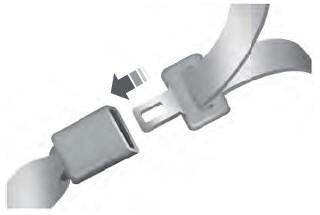
Lincoln Aviator. Fastening the Seatbelts

To unfasten, press the release button and remove the tongue from the buckle.

read more

 
Copyright © 2026 www.liaviator2.com