
Lincoln Aviator 2020-2026 Service Manual / Powertrain / Fuel System - General Information / Acceleration Control / Removal and Installation - Accelerator Pedal
Lincoln Aviator: Acceleration Control / Removal and Installation - Accelerator Pedal
Removal
NOTICE: Activate the parking brake.
NOTE: Make sure the vehicle powertrain is powered off.
NOTE: Removal steps in this procedure may contain installation details.
-
Remove the screw cap cover.
.jpg) |
-
Disconnect the electrical connector.
.jpg) |
-
-
Remove the bolt.
Torque: 115 lb.in (13 Nm)
-
Pedal slides forward out of bracket.
-
Remove the bolt.
.jpg) |
Installation
-
To install, reverse the removal procedure.
 Diagnosis and Testing - Acceleration Control
Diagnostic Trouble Code (DTC) Chart
Diagnostics in this manual assume a certain skill level and knowledge of Ford-specific diagnostic practices.REFER to: Diagnostic Methods (100-00 General Information, Description and Operation)...
 Electrical
..
Other information:
Lincoln Aviator 2020-2026 Service Manual: Description and Operation - Fuel Charging and Controls - System Operation and Component Description
System Operation Air Fuel Ratio Imbalance Monitor The air fuel ratio imbalance monitor is an on board diagnostic strategy designed to monitor the air fuel ratio. Air Fuel Ratio Imbalance Monitor — Heated Oxygen Sensor (HO2S) Monitor The air fuel ratio imbalance monitor estimates the cylinder to cylinder air fuel ratio difference using the universal HO2S high frequency signal...
Lincoln Aviator 2020-2026 Service Manual: Removal and Installation - Brake Pads
Special Tool(s) / General Equipment 12” / 300mm C-Clamp Removal WARNING: Service actions on vehicles equipped with electronic brake booster and electronic parking brakes may cause unexpected brake application, which could result in injury to hands or fingers...
Categories
- Manuals Home
- Lincoln Aviator Owners Manual
- Lincoln Aviator Service Manual
- Keyless Entry
- Drive Modes
- Fuel Quality
- New on site
- Most important about car
Remote Control
Passive Key
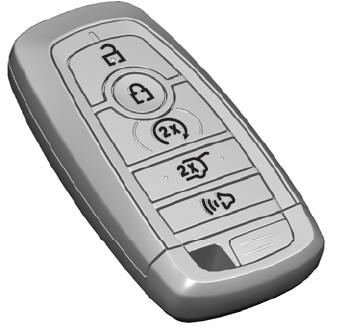
The passive key operates the power locks and the remote start system. The passive key must be in your vehicle to use the push button start.
Note: You may not be able to shift out of park (P) unless the passive key is inside your vehicle.

Copyright © 2026 www.liaviator2.com