Lincoln Aviator: Front Drive Axle/Differential / Removal and Installation - Axle Shaft Seal
Special Tool(s) / General Equipment
.jpg) |
205-907 Handle, 32 Driver TKIT-2008DH-FLM |
.jpg) |
307-256
(T92P-77000-FH)
Installer, Differential Fluid Seal TKIT-1992-FLMH/LMH |
Removal
-
NOTE: The stub shaft seals must be replaced whenever the halfshafts are removed.
Remove the front RH halfshaft.
Refer to: Halfshaft (205-04 Front Drive Halfshafts, Removal and Installation).
-
Remove and discard the front RH halfshaft seal.
.jpg) |
Installation
-
Inspect the differential housing surface for rust, nicks
and scratches. Polish the differential housing surface with fine crocus
cloth, if necessary.
.jpg) |
-
NOTE: Installation of the halfshaft oil seal without the correct tools can result in early seal failure.
NOTE: Do not disassemble the new oil seal.
Install the new seal onto a suitable special tool.
Use Special Service Tool: 307-256 (T92P-77000-FH) Installer, Differential Fluid Seal. , 205-907 Handle, 32 Driver.
.jpg) |
-
NOTICE: Strike only the handle. Directly striking the installer tool will damage the seal.
NOTE: Carefully align the halfshaft seal with the housing bore and ensure the seal should flush in the differential housing.
Using special tools, install the new front RH halfshaft seal.
Use Special Service Tool: 307-256 (T92P-77000-FH) Installer, Differential Fluid Seal. , 205-907 Handle, 32 Driver.
.jpg) |
-
Inspect the halfshaft seal lip for rust, nicks or
scratches prior to installing the halfshaft. Clean the seal lip with
fine crocus cloth, if required.
.jpg) |
-
Install the front RH halfshaft.
Refer to: Halfshaft (205-04 Front Drive Halfshafts, Removal and Installation).
-
Check the differential fluid level.
Refer to: Differential Fluid Level Check (205-03 Front Drive Axle/Differential, General Procedures).
 Removal and Installation - Axle Assembly
Removal
Remove the front driveshaft.
Refer to: Front Driveshaft (205-01 Driveshaft, Removal and Installation).
Drain the front differential fluid...
 Removal and Installation - Differential Breather Tube
Removal
NOTE:
Removal steps in this procedure may contain installation details.
Remove the front RH wheel only.
Refer to: Wheel and Tire (204-04A Wheels and Tires, Removal and Installation)...
Other information:
Lincoln Aviator 2020-2026 Owners Manual: Garage Door Opener
HomeLink Wireless Control System WARNING: Do not use the system with any garage door opener that does not have the safety stop and reverse feature as required by U.S. Federal Safety Standards (this includes any garage door opener manufactured before April 1, 1982)...
Lincoln Aviator 2020-2026 Service Manual: Removal and Installation - Driver Front Seat Module (DSM)
Removal NOTE: DSM (driver front seat module) shown, SCMB (front passenger seat control module) is similar. NOTE: Removal steps in this procedure may contain installation details. All vehicles NOTE: This step is only necessary when installing a new component...
Categories
- Manuals Home
- Lincoln Aviator Owners Manual
- Lincoln Aviator Service Manual
- Tire Change Procedure
- Configuring The Head Up Display
- Interior Lamps
- New on site
- Most important about car
Activating Intelligent Access
The intelligent access key must be within 3 ft (1 m) of the door or luggage compartment you intend to lock or unlock.
At a Door
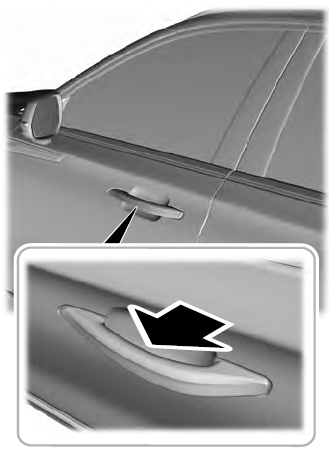
Electronic door handles are on each door. Gently depress the switch inside the exterior door handle to unlock and open the door. An unlock symbol illuminates on the door window trim indicating your vehicle is unlocked.