
Lincoln Aviator 2020-2026 Service Manual / Electrical / Climate Control System / Climate Control System - General Information / Removal and Installation - Climate Control Housing
Lincoln Aviator: Climate Control System - General Information / Removal and Installation - Climate Control Housing
Removal
NOTE: Removal steps in this procedure may contain installation details.
-
Remove the instrument panel.
Refer to: Instrument Panel (501-12 Instrument Panel and Console, Removal and Installation).
-
Remove the bolt, release the clips and remove the lower center instrument panel trim panel.
.jpg) |
-
Remove the bolts and the shift module and mounting plate.
-
Disconnect the electrical connector.
Torque: 44 lb.in (5 Nm)
-
Disconnect the electrical connector.
.jpg) |
-
Remove the bolts, and the nut and washer.
Torque: 62 lb.in (7 Nm)
.jpg) |
-
Remove the bolt, detach the wiring harness retainers and position the wiring harness aside.
Torque: 62 lb.in (7 Nm)
.jpg) |
-
Disconnect the electrical connector(s), detach the
wiring harness retainers and position the wiring harenss aside.
.jpg) |
-
Disconnect the electrical connector(s), detach the
wiring harness retainers and position the wiring harenss aside.
.jpg) |
-
Disconnect the electrical connector.
-
Remove the bolts.
Torque: 13 lb.in (1.5 Nm)
-
Remove the bolt.
Torque: 62 lb.in (7 Nm)
-
Remove the bolts.
.jpg) |
-
Remove screw, detach the harness retainers, and disconnect the electrical connectors.
.jpg) |
-
Remove the bolt, detech the wiring harness retainers and position the wiring harness aside.
Torque: 62 lb.in (7 Nm)
.jpg) |
-
Remove the climate control housing from the in-vehicle cross beam.
.jpg) |
Installation
-
To install, reverse the removal procedure.
 Removal and Installation - Center Registers
Special Tool(s) /
General Equipment
Interior Trim Remover
Removal
NOTE:
Removal steps in this procedure may contain installation details...
 Removal and Installation - Condenser - 3.0L EcoBoost
Removal
NOTICE:
During the removal of components, cap, tape or otherwise
appropriately protect all openings to prevent the ingress of dirt or
other contamination...
Other information:
Lincoln Aviator 2020-2026 Owners Manual: Switching Adaptive Cruise Control On and Off
The cruise controls are on the steering wheel. Switching Adaptive Cruise Control On Press the button to set the system in standby mode. The indicator, current gap setting and set speed appear in the information display. Switching Adaptive Cruise Control Off Press the button when the system is in standby mode, or switch the ignition off...
Lincoln Aviator 2020-2026 Owners Manual: Reporting Safety Defects (U.S. Only)
If you believe that your vehicle has a defect which could cause a crash or could cause injury or death, you should immediately inform the National Highway Traffic Safety Administration (NHTSA) in addition to notifying Ford Motor Company. If NHTSA receives similar complaints, it may open an investigation, and if it finds that a safety defect exists in a group of vehicles, it may order a recall and remedy campaign...
Categories
- Manuals Home
- Lincoln Aviator Owners Manual
- Lincoln Aviator Service Manual
- Wireless Accessory Charger (If Equipped)
- Disabling Auto-Start-Stop
- Fuel Quality
- New on site
- Most important about car
Adjusting the Steering Wheel - Vehicles With: Manual Adjustable Steering Column
WARNING: Do not adjust the steering wheel when your vehicle is moving.
Note: Make sure that you are sitting in the correct position.
Unlock the steering column. Adjust the steering wheel to the desired position.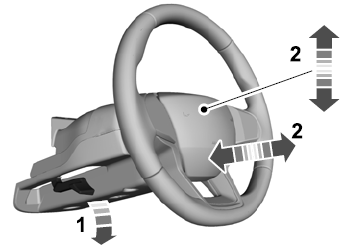

Copyright © 2026 www.liaviator2.com