
Lincoln Aviator: Climate Control System - General Information / Removal and Installation - Desiccant Bag - 3.0L EcoBoost

Special Tool(s) / General Equipment

Long Nose Pliers

Removal

NOTICE: During the removal of components, cap, tape or otherwise appropriately protect all openings to prevent the ingress of dirt or other contamination. Remove protective materials prior to installation.

NOTE: Installation of a new desiccant bag is not required when repairing the A/C system, except when there is physical evidence of contamination from a failed A/C compressor or damage to the receiver/drier desiccant bag. It is not necessary to add additional dye to the refrigerant system, the new receiver/drier desiccant bag comes with a new dye pellet. Damage to the receiver/drier desiccant bag includes physical damage to the receiver/drier desiccant bag or moisture contamination. Moisture contamination results only from a complete loss of refrigerant and equalization of the refrigerant system pressure with atmospheric pressure for a period longer than one hour. If even a slight amount of positive refrigerant pressure is present in the system before repairs are carried out, the receiver/drier desiccant bag should not be replaced.

NOTE: Removal steps in this procedure may contain installation details.

  1. Recover the refrigerant. Refer to the appropriate Recovery procedure in Group 412.
  1. Remove the CAC.
    Refer to: Charge Air Cooler (CAC) (303-12 Intake Air Distribution and Filtering - 3.0L EcoBoost/3.0L EcoBoost – Hybrid (BQ), Removal and Installation).
  1. Remove the receiver/drier cap.
  1. Remove the receiver/drier plug and the desiccant bag.
    Use the General Equipment: Long Nose Pliers

Installation

  1. To install, reverse the removal procedure.
  1. NOTICE: Only use the specified material to lubricate the seals.

    Install and lubricate new O-ring seals. Refer to the appropriate Specifications in Group 412.
  1. Lubricate the refrigerant system with the correct amount of clean PAG oil. Refer to the appropriate Refrigerant Oil Adding procedure in Group 412.

    Removal and Installation - Condenser Outlet Line - 3.0L EcoBoost

    Removal NOTE: The condenser inlet and outlet line are installed as a one-piece assembly. Remove the condenser inlet line. Refer to: Condenser Inlet Line - 3...

    Removal and Installation - Driver Side Footwell Air Discharge Temperature Sensor

    Removal Remove the driver knee airbag. Refer to: Driver Knee Airbag (501-20B Supplemental Restraint System, Removal and Installation). Remove the driver side register air discharge tempreature sensor...

    Other information:

    Lincoln Aviator 2020-2026 Service Manual: Diagnosis and Testing - Interior Lighting


    Diagnostic Trouble Code (DTC) Chart Diagnostics in this manual assume a certain skill level and knowledge of Ford-specific diagnostic practices. REFER to: Diagnostic Methods (100-00 General Information, Description and Operation).   Diagnostic Trouble Code Chart Module   DTC Description Action   BCM B1175:01 Driver Door Ajar Switch:General Electrical Failure If the courtesy lamps are inoperative, GO to Pinpoint Test A   BCM B1175:01 Driver Door Ajar Switch:General Electrical Failure If the courtesy lamps are always on, GO to Pinpoint Test C   BCM B1176:01 Passenger Door Ajar Switch:General Electrical Failure If the courtesy lamps are inoperative, GO to Pinpoint Test A   BCM B1176:01 Passenger Door Ajar Switch:General Electrical Failure If the courtesy lamps are always on, GO to Pinpoint Test C   BCM B11C0:01 Driver Side Rear Door Ajar Switch:General Electrical Failure If the courtesy lamps are inoperative, GO to Pinpoint Test A   BCM B11C0:01 Driver Side Rear Door Ajar Switch:General Electrical Failure If the courtesy lamps are always on, GO to Pinpoint Test C   BCM B11C1:01 Passenger Side Rear Door Ajar Switch:General Electrical Failure If the courtesy lamps are inoperative, GO to Pinpoint Test A   BCM B11C1:01 Passenger Side Rear Door Ajar Switch:General Electrical Failure If the courtesy lamps are always on, GO to Pinpoint Test C   BCM B12C2:11 Puddle Lamp:Circuit Short To Ground   GO to Pinpoint Test H   BCM B12C2:15 Puddle Lamp:Circuit Short To Battery or Open   GO to Pinpoint Test H   BCM B1306:01 Liftgate Ajar Switch:General Electrical Failure   GO to Pinpoint Test K   BCM B1306:11 Liftgate Ajar Switch:Circuit Short To Ground   GO to Pinpoint Test K   BCM B1313:11 Interior Lighting Output:Circuit Short To Ground   GO to Pinpoint Test B   BCM B1313:15 Interior Lighting Output:Circuit Short To Battery or Open If the courtesy lamps are always on, GO to Pinpoint Test B   BCM B1313:15 Interior Lighting Output:Circuit Short To Battery or Open If the courtesy lamps are always on, GO to Pinpoint Test D   BCM B145C:11 Ambient Lighting Power Supply Output:Circuit Short To Ground   GO to Pinpoint Test I   BCM B145C:15 Ambient Lighting Power Supply Output:Circuit Short To Battery or Open   GO to Pinpoint Test I   BCM B1465:00 Ambient Lighting Bus 1:No Sub Type Information If all the ambient lighting is inoperative, always on or does not change color/intensity, GO to Pinpoint Test I   BCM B1465:00 Ambient Lighting Bus 1:No Sub Type Information If one or more of the ambient lighting Light Emitting Diodes (LEDs) are inoperative or do not change color/intensity, GO to Pinpoint Test J   BCM B1465:96 Ambient Lighting Bus 1:Component Internal Failure If all the ambient lighting is inoperative, always on or does not change color/intensity, GO to Pinpoint Test I   BCM B1465:96 Ambient Lighting Bus 1:Component Internal Failure If one or more of the ambient lighting Light Emitting Diodes (LEDs) are inoperative or do not change color/intensity, GO to Pinpoint Test J   BCM B1467:00 Ambient Lighting Bus 3:No Sub Type Information If all the ambient lighting is inoperative, always on or does not change color/intensity, GO to Pinpoint Test I   BCM B1467:00 Ambient Lighting Bus 3:No Sub Type Information If one or more of the ambient lighting Light Emitting Diodes (LEDs) are inoperative or do not change color/intensity, GO to Pinpoint Test J   BCM B1467:96 Ambient Lighting Bus 3:Component Internal Failure If all the ambient lighting is inoperative, always on or does not change color/intensity, GO to Pinpoint Test I   BCM B1467:96 Ambient Lighting Bus 3:Component Internal Failure If one or more of the ambient lighting Light Emitting Diodes (LEDs) are inoperative or do not change color/intensity, GO to Pinpoint Test J   BCM B14AA:11 Demand Lamp Output:Circuit Short To Ground   GO to Pinpoint Test E   BCM B14AA:15 Demand Lamp Output:Circuit Short To Battery or Open   GO to Pinpoint Test E   BCM B153C:11 Color Ambient Light Output:Circuit Short To Ground   GO to Pinpoint Test I   BCM B153C:15 Color Ambient Light Output:Circuit Short To Battery or Open   GO to Pinpoint Test I   DCME B1175:19 Drivers Door Ajar Switch:Circuit Current Above Threshold   GO to Pinpoint Test C   DCMF B1176:19 Passenger Door Ajar Switch:Circuit Current Above Threshold   GO to Pinpoint Test C   DCMG B11C0:19 Driver Side Rear Door Ajar Switch:Circuit Current Above Threshold   GO to Pinpoint Test C   DCMH B11C1:19 Passenger Side Rear Door Ajar Switch:Circuit Current Above Threshold   GO to Pinpoint Test C   DDM B1165:11 Left Front Puddle Lamp Output:Circuit Short To Ground   GO to Pinpoint Test G   DDM B1165:15 Left Front Puddle Lamp Output:Circuit Short To Battery Or Open   GO to Pinpoint Test G   PDM B1166:11 Right Front Puddle Lamp Output:Circuit Short To Ground   GO to Pinpoint Test G   PDM B1166:15 Right Front Puddle Lamp Output:Circuit Short To Battery Or Open   GO to Pinpoint Test G   RGTM B1306:12 Liftgate Ajar Switch:Circuit Short To Battery   GO to Pinpoint Test C Symptom Chart(s) Diagnostics in this manual assume a certain skill level and knowledge of Ford-specific diagnostic practices...

    Lincoln Aviator 2020-2026 Service Manual: General Procedures - Differential Draining and Filling


    Materials Name Specification Motorcraft® SAE 75W-140 Synthetic Rear Axle LubricantXY-75W140-QL WSL-M2C192-A  Draining With the vehicle in NEUTRAL, position it on a hoist. Refer to: Jacking and Lifting (100-02 Jacking and Lifting, Description and Operation)...

    Categories

    Locking and Unlocking the Doors from Inside
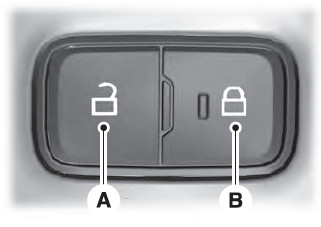
    Lincoln Aviator. Locking and Unlocking the Doors from Inside

    Unlock. Lock.

    Locking the Doors

    Press the lock switch on the door interior trim panel. The doors can no longer be released using the exterior door handle switches and the luggage compartment locks.

    read more

     
    Copyright © 2026 www.liaviator2.com