
Lincoln Aviator 2020-2025 Service Manual / Body and Paint / Body and Paint / Handles, Locks, Latches and Entry Systems / Removal and Installation - Exterior Rear Door Handle Reinforcement
Lincoln Aviator: Handles, Locks, Latches and Entry Systems / Removal and Installation - Exterior Rear Door Handle Reinforcement
Removal
NOTE: LH (left-hand) side shown, RH (right-hand) side similar.
NOTE: Removal steps in this procedure may contain installation details.
-
Remove the rear door window regulator and motor.
Refer to: Rear Door Window Regulator and Motor (501-11 Glass, Frames and Mechanisms, Removal and Installation).
-
NOTE: Rear door shown transparent for clarity.
Remove the aft rear door glass run and bracket.
-
Remove the bolts from the aft rear door glass run and bracket.
Torque: 93 lb.in (10.5 Nm)
-
Remove the aft rear door glass run and bracket.
-
Remove the bolts from the aft rear door glass run and bracket.
.jpg) |
-
NOTE: Rear door shown transparent for clarity.
Disconnect the exterior rear door handle electrical connector and position the wiring harness aside.
.jpg) |
-
Remove the exterior rear door handle reinforcement adhesive tape covers.
.jpg) |
-
NOTE: Rear door shown transparent for clarity.
Remove the exterior rear door handle and the exterior rear door handle reinforcement.
-
Remove the exterior rear door handle reinforcement nuts.
Torque: 80 lb.in (9 Nm)
-
Remove the exterior rear door handle reinforcement nut.
-
Remove the exterior rear door handle.
-
Remove the exterior rear door handle reinforcement nuts.
.jpg) |
-
Remove the exterior rear door handle gaskets.
.jpg) |
Installation
-
To install, reverse the removal procedure.
-
Carry out the power door window initialization.
Refer to: Power Door Window Initialization (501-11 Glass, Frames and Mechanisms, General Procedures).
 Removal and Installation - Exterior Rear Door Handle
Removal
NOTE:
LH (left-hand) side shown, RH (right-hand) side similar.
NOTE:
Removal steps in this procedure may contain installation details.
Remove the rear door window regulator and motor...
 Removal and Installation - Front Door Keyless Entry Antenna
Removal
NOTE:
LH (left-hand) side shown, RH (right-hand) side similar.
NOTE:
Removal steps in this procedure may contain installation details.
Remove the wheel and tire...
Other information:
Lincoln Aviator 2020-2025 Service Manual: General Procedures - Head Up Display (HUD) Module Calibration
Special Tool(s) / General Equipment 501-418Calibration Target - NO STEP File Available 501-421Eye Box Adjustment NOTE: If it is necessary to cancel any calibration adjustment use the return button to cancel the current adjustment...
Lincoln Aviator 2020-2025 Service Manual: General Procedures - Azimuth System Check
Check NOTE: The object used in this system check can be fabricated using a 9 cm diameter (3 in I.D.) pipe, 100 cm (39 in) in length (available as Polyvinyl Chloride (PVC) pipe, or similar from a hardware or plumbing supply. NOTE: The following system check should be carried out with the vehicle on a level surface...
Categories
- Manuals Home
- Lincoln Aviator Owners Manual
- Lincoln Aviator Service Manual
- Resetting the System
- Disabling Auto-Start-Stop
- Changing the Front Wiper Blades - Vehicles With: Heated Wiper Blades
- New on site
- Most important about car
Activating Intelligent Access
The intelligent access key must be within 3 ft (1 m) of the door or luggage compartment you intend to lock or unlock.
At a Door
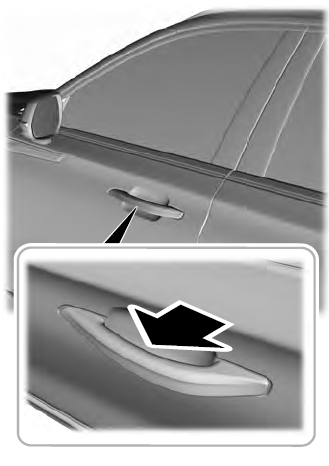
Electronic door handles are on each door. Gently depress the switch inside the exterior door handle to unlock and open the door. An unlock symbol illuminates on the door window trim indicating your vehicle is unlocked.

Copyright © 2025 www.liaviator2.com