
Lincoln Aviator 2020-2026 Service Manual / Electrical / Lighting / Exterior Lighting / Removal and Installation - Headlamp Leveling Sensor
Lincoln Aviator: Exterior Lighting / Removal and Installation - Headlamp Leveling Sensor
Removal
NOTE: Removal steps in this procedure may contain installation details.
Front suspension mounted
-
Remove the LH front wheel and tire assembly.
Refer to: Wheel and Tire (204-04A Wheels and Tires, Removal and Installation).
-
Disconnect the front ride height sensor electrical connector.
.jpg) |
-
Remove the front headlamp leveling sensor.
-
Remove the front headlamp leveling sensor arm ball stud from the lower control arm.
Torque: 80 lb.in (9 Nm)
-
Remove the front headlamp leveling sensor anchor plate bolt.
Torque: 177 lb.in (20 Nm)
-
Remove the front headlamp leveling sensor assembly.
-
Remove the front headlamp leveling sensor arm ball stud from the lower control arm.
.jpg) |
Rear suspension mounted
-
Remove the LH rear wheel and tire assembly.
Refer to: Wheel and Tire (204-04A Wheels and Tires, Removal and Installation).
-
Disconnect the rear ride height sensor electrical connector and separate the wiring harness guide.
.jpg) |
-
Lower the rear headlamp leveling sensor arm anchor plate.
-
Remove the rear headlamp leveling sensor anchor plate bolt.
Torque: 22 lb.ft (30 Nm)
-
Remove the rear headlamp leveling sensor arm anchor plate bolt.
Torque: 133 lb.in (15 Nm)
-
Remove the rear headlamp leveling sensor assembly.
-
Remove the rear headlamp leveling sensor anchor plate bolt.
.jpg) |
Installation
-
To install, reverse the removal procedure.
-
Calibrate the suspension height sensor. Using a
diagnostic scan tool, carry out the Ride Height Calibration routine.
Follow the scan tool directions.
 Removal and Installation - Headlamp Control Module (HCM)
Removal
NOTE:
This step is only necessary if the HCM is being replaced.
NOTE:
If installing a new module, it is necessary to
upload the module configuration information to the scan tool prior to
removing the module...
 Removal and Installation - Headlamp Switch
Removal
NOTE:
Removal steps in this procedure may contain installation details.
Detach the clips and lower the LH lower steering column trim panel...
Other information:
Lincoln Aviator 2020-2026 Service Manual: Diagnosis and Testing - High Voltage Battery, Mounting and Cables - Plug-In Hybrid Electric Vehicle (PHEV)
Diagnostic Trouble Code (DTC) Chart Diagnostics in this manual assume a certain skill level and knowledge of Ford-specific diagnostic practices. REFER to: Diagnostic Methods (100-00 General Information, Description and Operation). WARNING: To prevent the risk of high-voltage shock, always follow precisely all warnings and service instructions, including instructions to depower the system...
Lincoln Aviator 2020-2026 Owners Manual: Adaptive Cruise Control Precautions - Vehicles With: Adaptive Cruise Control With Lane Centering
Adaptive cruise control precautions apply to lane centering unless stated otherwise or contradicted by a lane centering precaution. WARNING: Do not use the system when towing a trailer. Failure to follow this instruction could result in the loss of control of your vehicle, personal injury or death...
Categories
- Manuals Home
- Lincoln Aviator Owners Manual
- Lincoln Aviator Service Manual
- General Procedures - Transmission Fluid Drain and Refill
- Interior Lamps
- Tire Change Procedure
- New on site
- Most important about car
Child Safety Locks
When the child safety locks are set, you cannot open the rear doors from the inside.
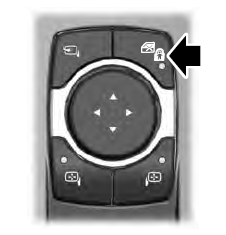
The child safety lock control is on the driver door.
Press the control to switch the child safety locks on. Press the control again to switch them off. A light on the child safety control illuminates when you switch them on.

Copyright © 2026 www.liaviator2.com