
Lincoln Aviator 2020-2026 Service Manual / Electrical / Information and Entertainment Systems / Information and Entertainment System - General Information / Removal and Installation - Overhead Speaker
Lincoln Aviator: Information and Entertainment System - General Information / Removal and Installation - Overhead Speaker
Removal
NOTE: Removal steps in this procedure may contain installation details.
NOTE: LH front speaker is shown, all others are similar.
-
Lower the headliner.
Refer to: Headliner - Lowering (501-05 Interior Trim and Ornamentation, Removal and Installation).
-
Disconnect the electrical connector.
.jpg) |
-
Release the tabs and remove the overhead speaker grille.
.jpg) |
-
Remove the screws and the overhead speaker.
Torque: 22 lb.in (2.5 Nm)
.jpg) |
Installation
-
To install, reverse the removal procedure.
 Removal and Installation - Media Hub
Special Tool(s) /
General Equipment
Interior Trim Remover
Removal
NOTE:
Removal steps in this procedure may contain installation details...
 Removal and Installation - Rear Audio Control Module (RACM)
Removal
NOTE:
Removal steps in this procedure may contain installation details.
NOTE:
Touchscreen controls shown, analog controls are similar.
NOTE:
If installing a new module, it is necessary to
upload the module configuration information to the scan tool prior to
removing the module...
Other information:
Lincoln Aviator 2020-2026 Service Manual: Diagnosis and Testing - Special Testing Procedures
Line Pressure Test This test verifies the line pressure is within specification. If available, refer to the Transmission Line Pressure Test general procedure to access the line pressure tap.REFER to: Transmission Line Pressure Test (307-01A Automatic Transmission - 10-Speed Automatic Transmission – 10R60, General Procedures)...
Lincoln Aviator 2020-2026 Service Manual: Description and Operation - Glass, Frames and Mechanisms - Overview
Overview Power Windows The power windows operate only when the accessory delay relay is active. The accessory delay relay is active whenever the ignition is on, or up to 10 minutes after the ignition is changed from on to off while the front driver and passenger doors remain closed...
Categories
- Manuals Home
- Lincoln Aviator Owners Manual
- Lincoln Aviator Service Manual
- Changing the Front Wiper Blades - Vehicles With: Heated Wiper Blades
- Resetting the System
- Drive Modes
- New on site
- Most important about car
Activating Intelligent Access
The intelligent access key must be within 3 ft (1 m) of the door or luggage compartment you intend to lock or unlock.
At a Door
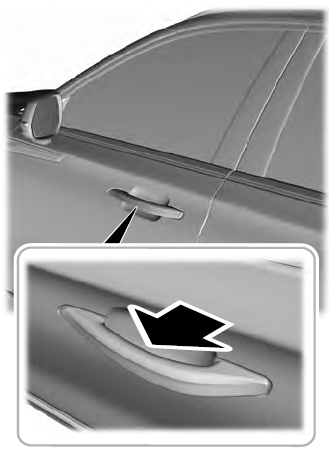
Electronic door handles are on each door. Gently depress the switch inside the exterior door handle to unlock and open the door. An unlock symbol illuminates on the door window trim indicating your vehicle is unlocked.

Copyright © 2026 www.liaviator2.com