
Lincoln Aviator 2020-2026 Service Manual / Body and Paint / Body and Paint / Roof Opening Panel / Removal and Installation - Roof Opening Panel Seal
Lincoln Aviator: Roof Opening Panel / Removal and Installation - Roof Opening Panel Seal
Removal
-
Remove the moonroof.
Refer to: Roof Opening Panel Frame (501-17 Roof Opening Panel, Removal and Installation).
-
To remove the seal, start at the splice joint at center
rear area and pull in the direction shown along the seal path instead of
pulling straight out at 90 degrees.
.jpg) |
Installation
-
-
Install the new seal by aligning the seal butt joint
to center of rear glass encapsulation mark. Press 50 mm onto flange at
butt joint first.
-
Align the rear corners and press down onto flange
assuring seal drain is in frame water pockets and spouts align.
-
Secure remaining rear seal to moonroof staring from corner and working inboard back to the butt joint.
-
Install the new seal by aligning the seal butt joint
to center of rear glass encapsulation mark. Press 50 mm onto flange at
butt joint first.
.jpg) |
-
-
Align front corners next and secure prior to securing front and sides.
-
Once front corners are installed, continue to work from corners and press on the front and side portions.
-
Align front corners next and secure prior to securing front and sides.
.jpg) |
-
NOTE: After installation of seal slight waviness of seal lip may be evident, but lip must lay open to allow proper engagement to roof flange.
Inspect that all seal corners drains are in frame water pockets and align with drain spouts.
.jpg) |
-
Apply krytox to outboard seal bulb and top side of lip.
.jpg) |
-
Install the moonroof.
Refer to: Roof Opening Panel Frame (501-17 Roof Opening Panel, Removal and Installation).
 Removal and Installation - Roof Opening Panel Motor
Removal
NOTE:
Removal steps in this procedure may contain installation details.
Lower the headliner.
Refer to: Headliner - Lowering (501-05 Interior Trim and Ornamentation, Removal and Installation)...
 Removal and Installation - Roof Opening Panel Shield
Removal
NOTE:
Removal steps in this procedure may contain installation details.
Remove the roof opening panel frame.
Refer to: Roof Opening Panel Frame (501-17 Roof Opening Panel, Removal and Installation)...
Other information:
Lincoln Aviator 2020-2026 Owners Manual: Recommended Tire Pressures and Inflating Your Tires
Safe operation of your vehicle requires that your tires are properly inflated. Remember that a tire can lose up to half of its air pressure without appearing flat. Every day before you drive, check your tires. If one looks lower than the others, use a tire gauge to check the pressure of all tires and adjust if required...
Lincoln Aviator 2020-2026 Service Manual: Removal and Installation - Rear Heater Core Inlet Line
Removal NOTE: The rear heater core inlet line is installed from the factory as a one-piece assembly. The replacement part is supplied as an assembly, containing the rear heater core outlet line and the rear evaporator inlet and outlet lines. Remove the rear evaporator rear outlet and inlet line...
Categories
- Manuals Home
- Lincoln Aviator Owners Manual
- Lincoln Aviator Service Manual
- General Procedures - Transmission Fluid Drain and Refill
- Child Safety Locks
- Wireless Accessory Charger (If Equipped)
- New on site
- Most important about car
Adjusting the Steering Wheel - Vehicles With: Manual Adjustable Steering Column
WARNING: Do not adjust the steering wheel when your vehicle is moving.
Note: Make sure that you are sitting in the correct position.
Unlock the steering column. Adjust the steering wheel to the desired position.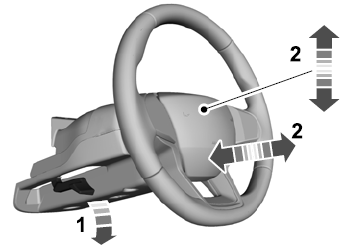

Copyright © 2026 www.liaviator2.com