
Lincoln Aviator 2020-2024 Service Manual / Electrical / Information and Entertainment Systems / Information and Entertainment System - General Information / Removal and Installation - Satellite Radio / Global Positioning System (GPS) Splitter / Cable
Lincoln Aviator: Information and Entertainment System - General Information / Removal and Installation - Satellite Radio / Global Positioning System (GPS) Splitter / Cable
Removal
NOTE: Removal steps in this procedure may contain installation details.
-
Remove the RH loadspace trim panel.
Refer to: Loadspace Trim Panel (501-05 Interior Trim and Ornamentation, Removal and Installation).
-
Disconnect the electrical connectors, separate and remove the satellite radio / GPS splitter / cable.
.jpg) |
Installation
-
To install, reverse the removal procedure.
 Removal and Installation - Satellite Radio / Global Positioning System (GPS) Antenna Cable
Removal
NOTE:
Removal steps in this procedure may contain installation details.
Instrument panel coaxial cable
Remove the instrument panel upper section...
 Removal and Installation - Subwoofer Amplifier
Removal
NOTE:
Removal steps in this procedure may contain installation details.
Remove the LH loadspace trim panel.
Refer to: Loadspace Trim Panel (501-05 Interior Trim and Ornamentation, Removal and Installation)...
Other information:
Lincoln Aviator 2020-2024 Service Manual: Removal and Installation - Accessory Drive Belt
Removal NOTICE: Under no circumstances should the accessory drive belt, tensioner or pulleys be lubricated as potential damage to the belt material and tensioner damping mechanism will occur. Do not apply any fluids or belt dressing to the accessory drive belt or pulleys...
Lincoln Aviator 2020-2024 Owners Manual: Engine Coolant Temperature Management (If Equipped)
WARNING: To reduce the risk of crash and injury, be prepared that the vehicle speed may reduce and the vehicle may not be able to accelerate with full power until the coolant temperature reduces. If you tow a trailer with your vehicle, the engine may temporarily reach a higher temperature during severe operating conditions, for example ascending a long or steep grade in high ambient temperatures...
Categories
- Manuals Home
- Lincoln Aviator Owners Manual
- Lincoln Aviator Service Manual
- Opening and Closing the Hood
- Garage Door Opener
- Wireless Accessory Charger (If Equipped)
- New on site
- Most important about car
Child Safety Locks
When the child safety locks are set, you cannot open the rear doors from the inside.
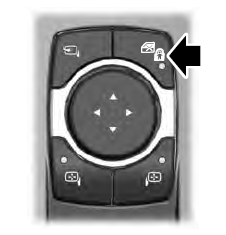
The child safety lock control is on the driver door.
Press the control to switch the child safety locks on. Press the control again to switch them off. A light on the child safety control illuminates when you switch them on.

Copyright © 2024 www.liaviator2.com