
Lincoln Aviator 2020-2026 Service Manual / Electrical / Instrumentation and Warning Systems / Parking Aid - Vehicles With: Parking Aid Camera / Removal and Installation - Side Parking Aid Camera
Lincoln Aviator: Parking Aid - Vehicles With: Parking Aid Camera / Removal and Installation - Side Parking Aid Camera
Removal
NOTE: Removal steps in this procedure may contain installation details.
-
Position the upper inner corner of the exterior mirror glass in.
.jpg) |
-
Separate the exterior mirror glass, disconnect the electrical connectors and remove the exterior mirror glass.
.jpg) |
-
Remove the screws, release the tab and remove the exterior mirror bezel.
.jpg) |
-
Remove the screw, the bracket, disconnect the connector and remove the camera.
.jpg) |
Installation
-
To install, reverse the removal procedure.
-
NOTE: Carry out the following step if installing a new front camera.
Initialize the camera.
Refer to: Parking Aid Camera Initialization (413-13C) .
-
Carry out the 360° camera alignment.
Refer to: 360 Degree View Camera Alignment (413-13C) .
 Removal and Installation - Rear Parking Aid Camera
Removal
Remove the reversing lamp.
Refer to: Reversing Lamp (417-01 Exterior Lighting, Removal and Installation).
Disconnect the rear view camera washer hose and the rear view camera electrical connector...

Other information:
Lincoln Aviator 2020-2026 Service Manual: Removal and Installation - Coolant Outlet Connector
Special Tool(s) / General Equipment Hose Clamp Remover/Installer Removal Remove the direct injection fuel rail LH. Refer to: Direct Injection Fuel Rail LH (303-04A Fuel Charging and Controls - 3.0L EcoBoost/3.0L EcoBoost – Hybrid (BQ), Removal and Installation)...
Lincoln Aviator 2020-2026 Service Manual: Removal and Installation - D-Pillar Speaker
Removal NOTE: Removal steps in this procedure may contain installation details. Remove the upper D-pillar trim panel. Refer to: D-Pillar Trim Panel (501-05 Interior Trim and Ornamentation, Removal and Installation). Remove the screws and the D-pillar speaker...
Categories
- Manuals Home
- Lincoln Aviator Owners Manual
- Lincoln Aviator Service Manual
- Remove and Reinstall the Battery
- USB Port and Power Point Locations
- Opening and Closing the Hood
- New on site
- Most important about car
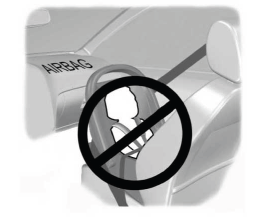
Children and Airbags
WARNING: Airbags can kill or injure a child in a child restraint. Never place a rear-facing child restraint in front of an active airbag. If you must use a forward-facing child restraint in the front seat, move the seat upon which the child restraint is installed all the way back.

Copyright © 2026 www.liaviator2.com