
Lincoln Aviator 2020-2026 Service Manual / Electrical / Information and Entertainment Systems / Information and Entertainment System - General Information / Removal and Installation - Subwoofer Speaker
Lincoln Aviator: Information and Entertainment System - General Information / Removal and Installation - Subwoofer Speaker
Removal
NOTE: Removal steps in this procedure may contain installation details.
All vehicles
-
Remove the LH loadspace trim panel.
Refer to: Loadspace Trim Panel (501-05 Interior Trim and Ornamentation, Removal and Installation).
Vehicles not equipped with Harmon® audio systems
-
Position the subwoofer assembly to access rear connectors.
-
Remove the nut and bracket.
Torque: 80 lb.in (9 Nm)
-
Remove the bolts.
Torque: 80 lb.in (9 Nm)
-
Remove the nut and bracket.
.jpg) |
-
Disconnect the electrical connector and remove the subwoofer assembly.
.jpg) |
-
Remove the screws and the amplifier.
.jpg) |
Vehicles equipped with Harmon® audio systems
-
Disconnect the subwoofer electrical connector.
.jpg) |
-
Position the subwoofer assembly to access rear connectors.
-
Remove the nut.
Torque: 80 lb.in (9 Nm)
-
Remove the bolts.
Torque: 80 lb.in (9 Nm)
-
Remove the nut.
.jpg) |
-
Disconnect the electrical connectors and remove the subwoofer assembly.
.jpg) |
-
Remove the screws and the DSP.
.jpg) |
Installation
-
To install, reverse the removal procedure.

 Removal and Installation - SYNC Module [APIM]
Special Tool(s) /
General Equipment
Interior Trim Remover
Removal
NOTE:
Removal steps in this procedure may contain installation details...
Other information:
Lincoln Aviator 2020-2026 Owners Manual: Changing the Front Wiper Blades - Vehicles Without: Heated Wiper Blades
You can improve poor wiper quality by cleaning the wiper blades and the windshield. Replace the wiper blades at least annually for optimum performance. Removing the Front Wiper Blades Lift the wiper blade from the windshield by holding the middle of the retainer...
Lincoln Aviator 2020-2026 Service Manual: Diagnosis and Testing - Engine Cooling
Special Tool(s) Coolant/Battery RefractometerROB75240 or equivalent D-Gas Adapter300-OTC014-R1068 or equivalent Radiator Tester014-R1072 or equivalent UView® Combustion Leak TesterUVU560000-R Diagnostic Trouble Code (DTC) Chart WARNING: Before beginning any service procedure in this section, refer to Safety Warnings in section 100-00 General Information...
Categories
- Manuals Home
- Lincoln Aviator Owners Manual
- Lincoln Aviator Service Manual
- Tire Change Procedure
- Changing the Front Wiper Blades - Vehicles With: Heated Wiper Blades
- Disabling Auto-Start-Stop
- New on site
- Most important about car
Fastening the Seatbelts
The front outboard and rear safety restraints in the vehicle are combination lap and shoulder belts.
Insert the belt tongue into the proper buckle (the buckle closest to the direction the tongue is coming from) until you hear a snap and feel it latch. Make sure that you securely fasten the tongue in the buckle.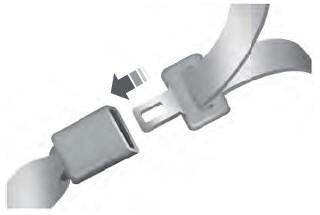

Copyright © 2026 www.liaviator2.com