
Lincoln Aviator: Transmission / Stay in Neutral Mode
Note: Stay in Neutral mode is a temporary vehicle state that works with the engine in a running or OFF state. Once in this mode, maintain sufficient battery voltage, or your vehicle returns to park (P) if left active for an extended period of time when the engine is off.
Failure to follow this instruction could result in vehicle damage not covered by the vehicle warranty.
Note: When entering an automatic car wash, always enter the Stay in Neutral mode. Stay in Neutral mode must be enabled if you are exiting the vehicle before the car wash.
Extended usage of Stay in Neutral mode could result in a battery voltage reduction to a level where the vehicle no longer starts.
Do not tow your vehicle in this mode.
With the transmission selector in Stay in Neutral mode, you can start your vehicle and it is free to roll.
To enter Stay in Neutral mode, do the following:
- Bring your vehicle to a complete stop.
- Shift into neutral (N).
- Press neutral (N) again within five seconds after shifting to neutral (N).
Note: The Stay in Neutral mode confirmation message appears in the information display when your vehicle has entered Stay in Neutral mode and the neutral (N) button on the transmission selector slowly blinks.
To exit Stay in Neutral mode, press park (P) at any time, or apply the brakes when the engine is running, to shift into a different driving position.
Note: You can select the (P) position with or without brakes applied when the engine is OFF.
 Automatic Return to Park
Note: This feature does not operate when
your vehicle is in Stay in Neutral mode or
neutral tow.
The transmission returns to park (P) if any of
the following occur:
You switch the ignition off...
 SelectShift Automatic™ Transmission
Your vehicle has a SelectShift Automatic
transmission. The SelectShift Automatic
transmission gives you the ability to change
gears up or down, without a clutch, as
preferred...
Other information:
Lincoln Aviator 2020-2026 Service Manual: Removal and Installation - Shift Solenoids (SS)
Materials Name Specification Motorcraft® MERCON® ULV Automatic Transmission FluidXT-12-QULV WSS-M2C949-A, MERCON® ULV Removal All Solenoids Remove the transmission fluid pan gasket and filter. Refer to: Transmission Fluid Pan, Gasket and Filter (307-01A Automatic Transmission - 10-Speed Automatic Transmission – 10R60, Removal and Installation)...
Lincoln Aviator 2020-2026 Service Manual: Removal and Installation - Steering Column Tilt Motor
Removal NOTE: Removal steps in this procedure may contain installation details. Remove the steering column. Refer to: Steering Column (211-04 Steering Column, Removal and Installation). NOTE: Note the position of the component before removal...
Categories
- Manuals Home
- Lincoln Aviator Owners Manual
- Lincoln Aviator Service Manual
- Interior Lamps
- Drive Modes
- Keyless Entry
- New on site
- Most important about car
Remote Control
Passive Key
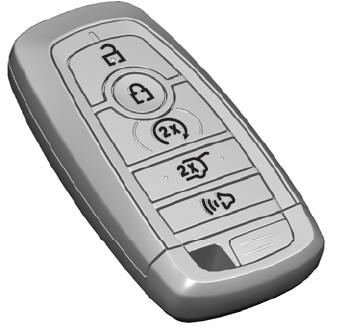
The passive key operates the power locks and the remote start system. The passive key must be in your vehicle to use the push button start.
Note: You may not be able to shift out of park (P) unless the passive key is inside your vehicle.
