
Lincoln Aviator 2020-2026 Owners Manual / SYNC™ 3 / SYNC™ 3 Troubleshooting
Lincoln Aviator: SYNC™ 3 / SYNC™ 3 Troubleshooting
- Voice Recognition
- USB and Bluetooth Audio
- Phone
- Navigation (If Equipped)
- Apps
- Wi-Fi Connectivity
- Personal Profiles (If Equipped)
- Resetting the System
 Settings
Press the button to enter the
settings menu.
Once you select a tile, press
the
button next to a menu item to view
an explanation of the feature or
setting...

Other information:
Lincoln Aviator 2020-2026 Owners Manual: Automatic Return to Park
Note: This feature does not operate when your vehicle is in Stay in Neutral mode or neutral tow. The transmission returns to park (P) if any of the following occur: You switch the ignition off. You do not have your seatbelt fastened and you open the driver door...
Lincoln Aviator 2020-2026 Owners Manual: General Information
The recommended tire inflation pressures are found on the Tire Label which is located on the B-pillar or the edge of the driver door. This information can also be found on the Safety Compliance Certification Label, affixed to either the door hinge pillar, door-latch post, or the door edge that meets the door-latch post; next to the driver’s seating position...
Categories
- Manuals Home
- Lincoln Aviator Owners Manual
- Lincoln Aviator Service Manual
- Changing the Front Wiper Blades - Vehicles With: Heated Wiper Blades
- Locking and Unlocking
- Tire Change Procedure
- New on site
- Most important about car
Locking and Unlocking the Doors from Inside
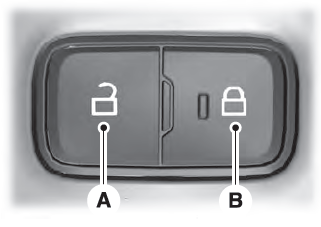
Locking the Doors
Press the lock switch on the door interior trim panel. The doors can no longer be released using the exterior door handle switches and the luggage compartment locks.

Copyright © 2026 www.liaviator2.com