Lincoln Aviator: Phone / Using Your Cell Phone
Recent Call List
Display and select an entry from a list of previous calls.
Contacts
Display a smart search form to look up your contacts. Use the List button to alphabetically sort your contacts.
Change Phone
Display the list of paired or connected devices that you can select.
Phone Settings
Change ring tones, alerts or pair another phone.
Do Not Disturb
Reject incoming calls and switch ring tones and alerts off.
Phone Keypad
Directly dial a number.
Mute
Mute the microphone when in a call or voice recognition session.
 Pairing Your Cell Phone for the First Time
Go to the settings menu on your cell phone
and switch Bluetooth on.
Select the phone option on the
feature bar.
Select Add Phone.Note: A prompt alerts you to search for
your
vehicle on your cell phone...
 Text Messaging
Setting Text Message Notification
iOS
Go to the settings menu on your cell
phone.
Select Bluetooth.
Select the information icon to the right of
your vehicle...
Other information:
Lincoln Aviator 2020-2026 Service Manual: Description and Operation - Rear Suspension - Component Location
N..
Lincoln Aviator 2020-2026 Service Manual: Removal and Installation - Rear Lower Arm
Special Tool(s) / General Equipment 204-592Separator, Lower Arm Ball JointTKIT-2006C-FFMFLMTKIT-2006C-LMTKIT-2006C-ROW Vehicle/Axle Stands Removal NOTICE: Suspension fasteners are critical parts that affect the performance of vital components and systems...
Categories
- Manuals Home
- Lincoln Aviator Owners Manual
- Lincoln Aviator Service Manual
- Body and Paint
- Locking and Unlocking
- Configuring The Head Up Display
- New on site
- Most important about car
Activating Intelligent Access
The intelligent access key must be within 3 ft (1 m) of the door or luggage compartment you intend to lock or unlock.
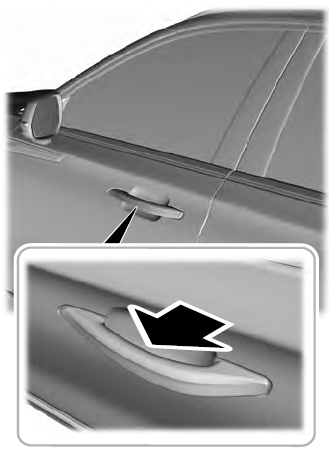
At a Door
Electronic door handles are on each door. Gently depress the switch inside the exterior door handle to unlock and open the door. An unlock symbol illuminates on the door window trim indicating your vehicle is unlocked.