
Lincoln Aviator: Front Seats / General Procedures - Seat Heater Mat Removal
Repair
.jpg) WARNING:
To minimize the risk of injury, always wear protective
gloves when working with a steamer. Failure to follow these instructions
may result in serious personal injury.
WARNING:
To minimize the risk of injury, always wear protective
gloves when working with a steamer. Failure to follow these instructions
may result in serious personal injury.
NOTE: Click here to view a video version of the seat heater mat removal and installation.
View
.jpg)
NOTE: During installation, it is allowable to adhere a new heater mat to any adhesive left behind on the foam.
NOTE: Typical seat cushion foam and heater mat shown, other seat cushion/backrest foam and heater mats are similar.
-
Acquire an automotive upholstery steamer with the following specifications.
1 Minimum 1 liter capacity 2 1300 – 1500 watts 3 Wide, T-Shaped, high durability plastic or metal (aluminum) steamer head
-
Remove the seat cushion or backrest cover. Refer to the
appropriate procedure in this or one of the other 501-10 sections.
-
Set up the commercially available steamer following the instruction sheet provided with the equipment.
-
Purge any water out of the steamer line and head before placing the steamer head on the heater mat.
-
NOTE: Only the areas with adhesive need to be steamed. Look at the back of the new heater mat or place a finger between the heater mat and foam to find the locations.
To soften the adhesive, locate 1 adhesive strip in a section of the foam, place the steamer head at one end of the heater mat and apply steam to that area for approximately 15 seconds before pulling on the heater mat.
.jpg) |
-
NOTICE: Peel the heater mat off the foam slowly as to not damage the foam and to remove the most amount of adhesive as possible.
Slowly pull the heater mat down the length of the adhesive strip, allowing the steamer head to follow and continue to soften the adhesive until the heater mat is detached from that portion of foam.
.jpg) |
-
Position the steamer head on the other side of the foam
section. Apply steam to that area for approximately 15 seconds and
slowly pull the heater mat down the length of the adhesive strip,
allowing the steamer head to follow and continue to soften the adhesive
until the heater mat is detached.
.jpg) |
-
Remove the heater mat.
-
Repeat steps 5 through 7 for each adhesive strip in each section of the foam.
-
Working from one end to the other, continue applying
steam and peeling the heater mat off the foam until the heater mat is
completely removed.
-
If required, route out the heater mat wiring harness from the foam.
-
Repeat steps 5 through 7 for each adhesive strip in each section of the foam.
.jpg) |
-
NOTE: Allow enough time for the moisture/water to dry or the new heater mat will not stick to the foam.
Let the foam stand for 5 minutes to allow any residual moisture to evaporate.
.jpg) |
-
Install a new heater mat.
Refer to: Seat Heater Mat Installation (501-10A Front Seats, General Procedures).
 General Procedures - Seat Heater Mat Installation
Repair
NOTE:
Click here to view a video version of the seat heater mat removal and installation. View
NOTE:
Always install a new heater mat...
 Removal and Installation - Driver Front Seat Module (DSM)
Removal
NOTE:
DSM (driver front seat module) shown, SCMB (front passenger seat control module) is similar.
NOTE:
Removal steps in this procedure may contain installation details...
Other information:
Lincoln Aviator 2020-2026 Service Manual: Removal and Installation - Front Scuff Plate Trim Panel
Special Tool(s) / General Equipment Interior Trim Remover Removal NOTE: LH (left hand) shown, RH (right hand) similar. All sides Release the clips and remove the instrument panel side trim panel. Use the General Equipment: Interior Trim Remover Remove the cowl side trim panel...
Lincoln Aviator 2020-2026 Service Manual: Diagnosis and Testing - High-Pressure Fuel System
Diagnostic Trouble Code (DTC) Chart Diagnostics in this manual assume a certain skill level and knowledge of Ford-specific diagnostic practices.REFER to: Diagnostic Methods (100-00 General Information, Description and Operation). Diagnostic Trouble Code Chart Module DTC Description Action PCM P0001:00 Fuel Volume Regulator Control Circuit/Open: No Sub Type Information GO to Pinpoint Test HP PCM P0003:00 Fuel Volume Regulator Control Circuit Low: No Sub Type Information GO to Pinpoint Test HP PCM P0004:00 Fuel Volume Regulator Control Circuit High: No Sub Type Information GO to Pinpoint Test HP PCM P0087:00 Fuel Rail/System Pressure - Too Low (Bank 1): No Sub Type Information GO to Pinpoint Test HP PCM P0088:00 Fuel Rail/System Pressure - Too High (Bank 1): No Sub Type Information GO to Pinpoint Test HP PCM P00C6:00 Fuel Rail Pressure Too Low - Engine Cranking (Bank 1): No Sub Type Information GO to Pinpoint Test HP PCM P053F:00 Cold Start Fuel Pressure Performance Bank 1: No Sub Type Information GO to Pinpoint Test HP Global Customer Symptom Code (GCSC) Chart Diagnostics in this manual assume a certain skill level and knowledge of Ford-specific diagnostic practices...
Categories
- Manuals Home
- Lincoln Aviator Owners Manual
- Lincoln Aviator Service Manual
- Garage Door Opener
- Configuring The Head Up Display
- Locking and Unlocking
- New on site
- Most important about car
Locking and Unlocking the Doors from Inside
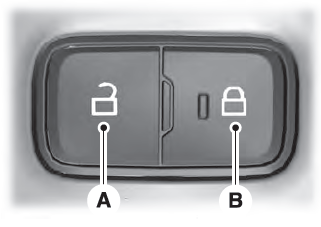
Locking the Doors
Press the lock switch on the door interior trim panel. The doors can no longer be released using the exterior door handle switches and the luggage compartment locks.
