Lincoln Aviator 2020-2026 Service Manual / Body and Paint / Body and Paint / Handles, Locks, Latches and Entry Systems

Lincoln Aviator: Body and Paint / Handles, Locks, Latches and Entry Systems

Removal and Installation - Overhead Console

Special Tool(s) / General Equipment Interior Trim Remover Removal Starting at the back, release the clips and remove the overhead console...

Description and Operation - Handles, Locks, Latches and Entry Systems - Component Location

N..

Other information:

Lincoln Aviator 2020-2026 Service Manual: Diagnosis and Testing - Parking Aid


Diagnostic Trouble Code (DTC) Chart Diagnostics in this manual assume a certain skill level and knowledge of Ford-specific diagnostic practices. REFER to: Diagnostic Methods (100-00 General Information, Description and Operation).   Diagnostic Trouble Code Chart Module   DTC Description Action   APIM C1001:01 Vision System Camera:General Electrical Failure   GO to Pinpoint Test A   APIM C1001:01 Vision System Camera:General Electrical Failure   GO to Pinpoint Test J   APIM C1001:02 Vision System Camera:General Signal Failure   GO to Pinpoint Test A   APIM C1001:1C Vision System Camera:Circuit Voltage Out Of Range   GO to Pinpoint Test A   APIM C1001:4B Vision System Camera:Over Temperature   GO to Pinpoint Test H   APIM C1001:55 Vision System Camera:Not Configured   GO to Pinpoint Test I   APIM C1001:81 Vision System Camera:Invalid Serial Data Received   GO to Pinpoint Test A   APIM C1001:87 Vision System Camera:Missing Message   GO to Pinpoint Test A   IPMB B115E:31 Camera Module:No Signal   GO to Pinpoint Test L   IPMB B115E:49 Camera Module:Internal Electronic Failure   GO to Pinpoint Test T   IPMB B12BE:31 Left Front Camera:No Signal   GO to Pinpoint Test N   IPMB B12BE:49 Left Front Camera:Internal Electronic Failure   GO to Pinpoint Test U   IPMB B12BF:31 Right Front Camera:No Signal   GO to Pinpoint Test O   IPMB B12BF:49 Right Front Camera:Internal Electronic Failure   GO to Pinpoint Test V   IPMB B148E:31 Front Camera:No Signal   GO to Pinpoint Test M   IPMB B148E:49 Front Camera:Internal Electronic Failure   GO to Pinpoint Test W   IPMB B14A5:11 Multi-Camera View Switch:Circuit Short To Ground   GO to Pinpoint Test P   IPMB C1001:78 Vision System Camera:Alignment Or Adjustment Incorrect   GO to Pinpoint Test X   IPMB U0100:00 Lost Communication With ECM/PCM "A":No Sub Type Information   GO to Pinpoint Test Y   IPMB U0121:00 Lost Communication With Anti-Lock Brake System (ABS) Control Module:No Sub Type Information   GO to Pinpoint Test Z   IPMB U0121:87 Lost Communication With Anti-Lock Brake System (ABS) Control Module "A":Missing Message   GO to Pinpoint Test Z   IPMB U0131:00 Lost Communication With Power Steering Control Module:No Sub-Type Information   GO to Pinpoint Test AA   IPMB U0131:87 Lost Communication With Power Steering Control Module "A":Missing Message   GO to Pinpoint Test AA   IPMB U0138:00 Lost Communication with All Terrain Control Module:No Sub Type Information   GO to Pinpoint Test AB   IPMB U0140:00 Lost Communication With Body Control Module:No Sub Type Information   GO to Pinpoint Test AC   IPMB U0146:00 Lost Communication With Gateway "A":No Sub Type Information   GO to Pinpoint Test AD   IPMB U0212:00 Lost Communication With Steering Column Control Module:No Sub Type Information   GO to Pinpoint Test AJ   IPMB U0253:87 Lost Communication With Accessory Protocol Interface Module:Missing Message   GO to Pinpoint Test AK   IPMB U0293:00 Lost Communication with Hybrid/EV Powertrain Control Module:No Sub Type Information   GO to Pinpoint Test Y   IPMB U0300:57 Internal Control Module Software Incompatibility:Invalid/Incompatible Software Component   GO to Pinpoint Test AN   IPMB U0401:00 Invalid Data Received from ECM/PCM A:No Sub Type Information   GO to Pinpoint Test Y   IPMB U0415:00 Invalid Data Received from Anti-Lock Brake System (ABS) Control Module "A":No Sub Type Information   GO to Pinpoint Test Z   IPMB U0420:00 Invalid Data Received from Power Steering Control Module "A":No Sub Type Information   GO to Pinpoint Test AA   IPMB U0422:00 Invalid Data Received From Body Control Module:No Sub Type Information   GO to Pinpoint Test AC   IPMB U0423:82 Invalid Data Received from Instrument Panel Cluster Control Module:Alive/Sequence Counter Incorrect/Not Updated   GO to Pinpoint Test AE   IPMB U0424:00 Invalid Data Received From HVAC Control Module:No Sub Type Information   GO to Pinpoint Test AF   IPMB U0424:82 Invalid Data Received From HVAC Control Module:Alive/Sequence Counter Incorrect/Not Updated   GO to Pinpoint Test AF   IPMB U0428:00 Invalid Data Received From Steering Angle Sensor Module:No Sub Type Information   GO to Pinpoint Test AG   IPMB U0485:82 Invalid Data Received From Radio:Alive/Sequence Counter Incorrect/Not Updated   GO to Pinpoint Test AH   IPMB U0553:82 Invalid Data Received From Lighting Control Module-Rear "B":Alive/Sequence Counter Incorrect/Not Updated   GO to Pinpoint Test AI   IPMB U0554:00 Invalid Data Received From Accessory Protocol Interface Module:No Sub Type Information   GO to Pinpoint Test AK   IPMB U0554:82 Invalid Data Received From Accessory Protocol Interface Module:Alive/Sequence Counter Incorrect/Not Updated   GO to Pinpoint Test AK   IPMB U0594:00 Invalid Data Received From Hybrid/EV Powertrain Control Module:No Sub Type Information   GO to Pinpoint Test Y   IPMB U1000:11 Solid State Driver Protection Active -Driver Disabled:Circuit Short To Ground   GO to Pinpoint Test AL   IPMB U2024:41 Control Module Cal-Config Data:General Checksum Failure   GO to Pinpoint Test AM   IPMB U2100:00 Initial Configuration Not Complete:No Sub Type Information   GO to Pinpoint Test AM   IPMB U2101:00 Control Module Configuration Incompatible:No Sub Type Information   GO to Pinpoint Test AM   IPMB U3000:42 Control Module:General Memory Failure   GO to Pinpoint Test AN   IPMB U3000:49 Control Module:Internal Electronic Failure   GO to Pinpoint Test AN Symptom Chart(s) Rear Only Parking Aid Camera Diagnostics in this manual assume a certain skill level and knowledge of Ford-specific diagnostic practices...

Lincoln Aviator 2020-2026 Owners Manual: Using Apps on an Android Device


Select the apps option on the feature bar. If your device is connected via USB, switch Android Auto off. Pair your device. Start the apps on your device that you want to use through SYNC.Note: If you close the apps on your device, you will not be able to use them through the system...

Categories

Remote Control

Passive Key

Lincoln Aviator. Remote Control

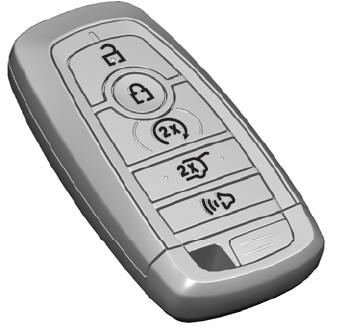
The passive key operates the power locks and the remote start system. The passive key must be in your vehicle to use the push button start.

Note: You may not be able to shift out of park (P) unless the passive key is inside your vehicle.

read more

 
Copyright © 2026 www.liaviator2.com