
Lincoln Aviator 2020-2026 Owners Manual / Unique Driving Characteristics / Hybrid Vehicle Operation
Lincoln Aviator: Unique Driving Characteristics / Hybrid Vehicle Operation
This hybrid vehicle combines electric and gasoline propulsion to provide breakthrough performance and improved efficiency. Familiarizing yourself with these unique characteristics provides an optimal driving experience from your vehicle.
- Starting, Driving and Stopping
- Transmission Operation. Battery
- Braking
- Driving to Optimize Fuel Economy
 Disabling Auto-Start-Stop
Press the button on the
instrument
panel to access the
Auto-Start-Stop feature on the
touchscreen. Use the touchscreen to
deactivate the feature...
 Starting, Driving and Stopping
Starting
When you start your vehicle, a
green READY indicator light
appears in the instrument cluster
letting you know that your vehicle is ready
for driving...
Other information:
Lincoln Aviator 2020-2026 Service Manual: Description and Operation - Parking Brake - System Operation and Component Description
System Operation System Diagram E338887 *.sttxt { visibility: hidden; } *.stcallout { visibility: visible; } 1 Parking Brake Control Switch 2 LH Parking Brake Actuator Motor 3 RH Parking Brake Actuator Motor 4 PCM 5 GSM 6 RCM 7 BCM 8 GWM 9 IPC 10 ABS HS-CAN 2 HS-CAN 1 FD-CAN HS-CAN 3 Item Description 1 Parking Brake Control Switch 2 LH Parking Brake Actuator Motor 3 RH Parking Brake Actuator Motor 4 PCM 5 GSM 6 RCM 7 BCM 8 GWM 9 IPC 10 ABS Network Message Chart ABS Module Electronic Parking Brake Network Input Messages Broadcast Message Originating Module Message Purpose Accelerator pedal position PCM This message is sent to the GWM and then to the ABS module...
Lincoln Aviator 2020-2026 Owners Manual: Event Data
This vehicle is equipped with an event data recorder. The main purpose of an event data recorder is to record, in certain crash or near crash-like situations, such as an airbag deployment or hitting a road obstacle; this data will assist in understanding how a vehicle’s systems performed...
Categories
- Manuals Home
- Lincoln Aviator Owners Manual
- Lincoln Aviator Service Manual
- Resetting the System
- General Procedures - Transmission Fluid Drain and Refill
- Remove and Reinstall the Battery
- New on site
- Most important about car
Child Safety Locks
When the child safety locks are set, you cannot open the rear doors from the inside.
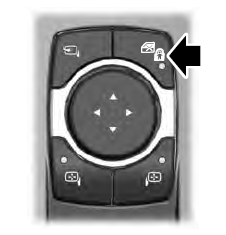
The child safety lock control is on the driver door.
Press the control to switch the child safety locks on. Press the control again to switch them off. A light on the child safety control illuminates when you switch them on.

Copyright © 2026 www.liaviator2.com