
Lincoln Aviator: Rear View Camera / Rear Camera Delay
Selectable settings for this feature are ON and OFF.
The default setting for the rear camera delay is OFF.
When shifting the transmission out of reverse (R) and into any gear other than park (P), the camera image remains in the display until:
- Your vehicle speed reaches approximately 5 mph (8 km/h).
- You shift your vehicle into park (P).
 Manual Zoom
WARNING: When manual zoom is
on, the full area behind your vehicle may
not show. Be aware of your surroundings
when using the manual zoom feature.
Note: Manual zoom is only available when
the transmission is in reverse (R)...
 360 Degree Camera (If Equipped)
WARNING: The 360 degree camera
system still requires the driver to use it in
conjunction with looking out of the
windows, and checking the interior and
exterior mirrors for maximum coverage...
Other information:
Lincoln Aviator 2020-2026 Service Manual: Removal and Installation - Second Row Center Seat Backrest Cover
Special Tool(s) / General Equipment Interior Trim Remover Removal NOTE: Removal steps in this procedure may contain installation details. Remove the second row center seat. Refer to: Second Row Center Seat (501-10B Second Row Seats, Removal and Installation)...
Lincoln Aviator 2020-2026 Service Manual: Description and Operation - Front Seats - System Operation and Component Description
System Operation System Diagram - Driver Memory Seat Item Description 1 HS-CAN1 2 PCM 3 BCM 4 HS-CAN1 5 Ignition Switch 6 GWM 7 Memory Set Switch 8 MS-CAN 9 DSM 10 MS-CAN 11 DDM 12 Memory Power Seat Motors 13 LIN 14 Driver Seat Control Switch 15 SCMG 16 MS-CAN 17 With Multi-Contour Seats Network Message Chart - Driver Memory Seat DSM Network Input Messages Broadcast Message Originating Module Message Purpose Key-in-ignition status BCM Provides the ignition status...
Categories
- Manuals Home
- Lincoln Aviator Owners Manual
- Lincoln Aviator Service Manual
- Garage Door Opener
- Disabling Auto-Start-Stop
- Locking and Unlocking
- New on site
- Most important about car
Activating Intelligent Access
The intelligent access key must be within 3 ft (1 m) of the door or luggage compartment you intend to lock or unlock.
At a Door
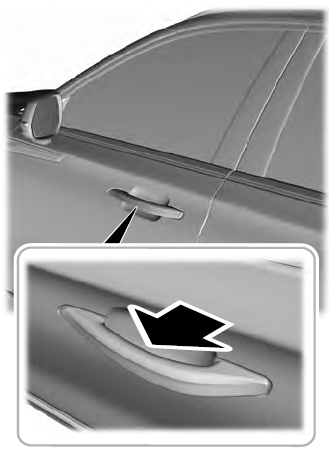
Electronic door handles are on each door. Gently depress the switch inside the exterior door handle to unlock and open the door. An unlock symbol illuminates on the door window trim indicating your vehicle is unlocked.

Copyright © 2026 www.liaviator2.com